 Use ChatGPT or Claude to Reply to Customer Messages in 2 Minutes: Prompt Templates for Shop Owners
Use ChatGPT or Claude to Reply to Customer Messages in 2 Minutes: Prompt Templates for Shop Owners
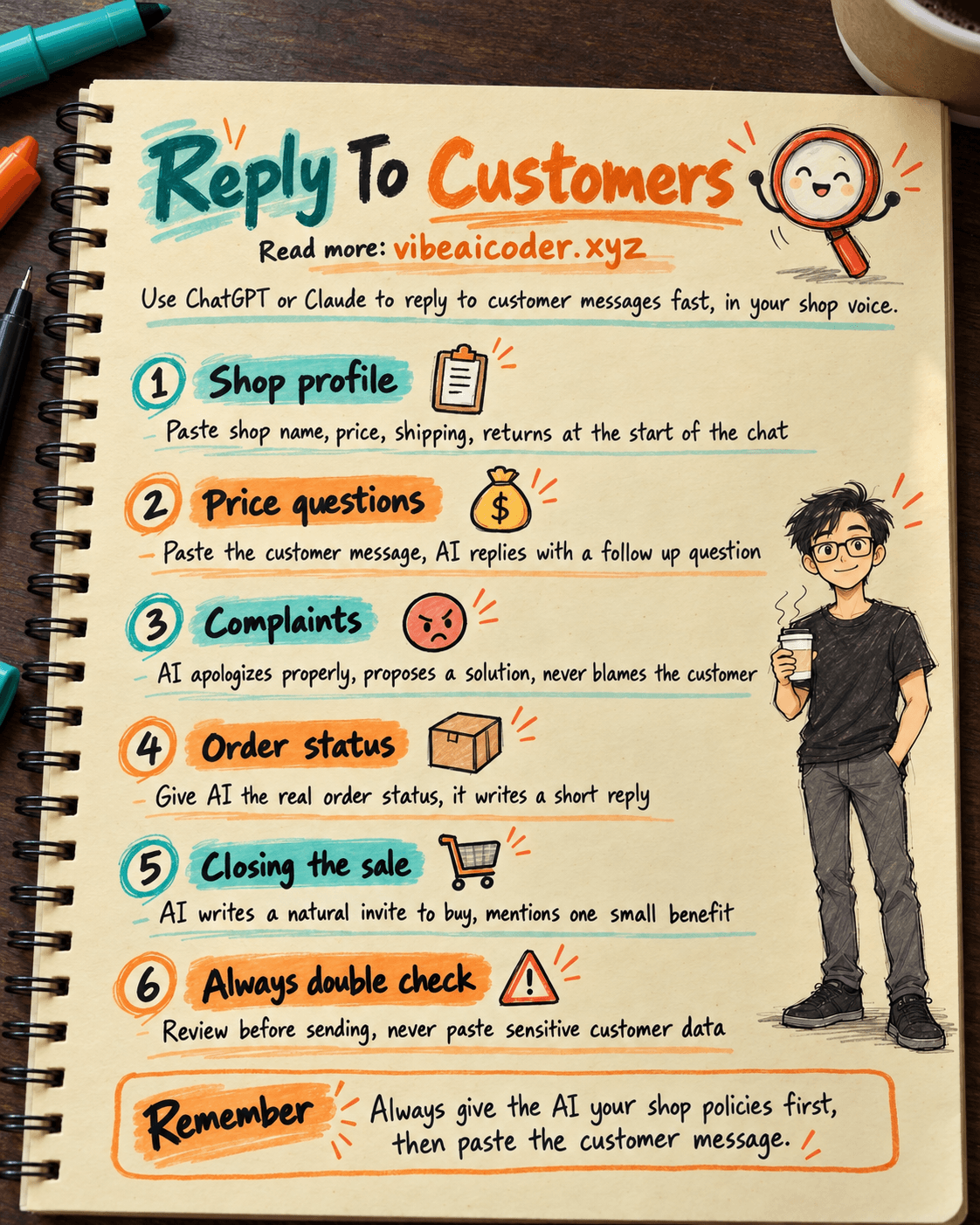
If you sell online, you probably type almost the same reply over and over every day: someone asks the price, someone asks about sizing, someone wants to know where their order is, and every so often an upset customer messages about a damaged item. This post gives you a set of ready made prompts. Paste one into ChatGPT or Claude and you get a polite reply in your shop's own voice in about 2 minutes. No coding, no API setup, just a free ChatGPT or Claude account.
 What you need
- An AI chat account: ChatGPT (the free tier works fine) or Claude (also has a free tier). Both open in a mobile browser, nothing to install.
- A "shop profile": a short note with your shop name, main products, shipping policy, return policy and working hours. Write it once and reuse it forever. If you do not have one yet, spend 5 minutes writing it before anything else, it matters more than the prompts below.
 Step by step
Step 1: Paste your shop profile at the start of the chat
Open a new chat and paste this first so the AI remembers it for the rest of the conversation:
You are a customer reply assistant for my shop. Here is the shop information, remember and use exactly this, do not invent anything extra:

- Shop name: [shop name]
- Main products: [e.g. women's clothing, Asian sizing]
- Price/shipping: [e.g. free shipping over 300k VND, 2 to 4 day nationwide delivery]
- Returns: [e.g. size exchange within 7 days, tags still on, unworn]
- Reply hours: [e.g. 8am to 9pm daily]
- Preferred tone: [e.g. friendly, call the customer "bạn", occasional light emoji]

From now on, whenever I paste a customer message, write me a short reply in the tone above.
With Claude you can save this inside a "Project" dedicated to your shop so you do not have to paste it again. ChatGPT's paid tier has "Custom GPTs" for the same purpose; the free tier works fine if you just paste it each time.
Step 2: Prompt for price and product questions
Copy the customer's exact message and use this template:
Customer wrote: "[paste the exact customer message]"

Write me a reply, and end with a small follow up question (like asking for size or address) so the message does not just trail off.
Step 3: Prompt for complaints
This is the trickiest situation to handle well when you are typing while frustrated yourself, so letting AI draft it first and then reading it over is the safest approach:
The customer is unhappy, they wrote: "[paste the exact customer message]"

Write me a reply: apologize sincerely first, do not blame the customer, then propose a concrete solution based on the return policy above. Keep the tone calm, no long explanations.
Step 4: Prompt for order status questions
Customer is asking about their order: "[paste the exact customer message]"

Real order info: [order code, status, e.g. "handed to the courier yesterday, expected delivery in 2 days"]

Write a short reply based exactly on the info above, do not guess any dates I have not given you.
Step 5: Prompt to close the sale
Once a customer has asked their questions and seems close to buying, use this to nudge gently:
The customer has finished asking about the product and seems to be considering buying. Recent messages: "[paste the last 2 to 3 messages]"

Write a reply that naturally invites them to complete the purchase, not pushy, and can mention one small benefit (e.g. free shipping, limited stock).
Step 6: Save the prompt set for daily use
Copy the 5 prompts above into a note (phone notes, Google Docs, or Notion). Each time you need one, copy the template, fill in the customer's message where you see [...], and paste it into the AI. Once you get used to it, each message takes about 30 seconds to a minute, reading time included. The same approach works for drafting professional work emails to suppliers or partners: give the AI enough context and let it write the wording.
 Example result
Customer: "Hi, do you still have size M in this shirt, and how long does delivery to Can Tho take?"
AI reply (after the shop profile from Step 1 was already set up):
Yes, we still have size M! 🥰 Delivery to Can Tho usually takes 3 to 4 days, and shipping is free for orders over 300k VND. Could you share your phone number and address so we can place the order right away?
The reply already has correct facts (because you told the AI your shipping policy), matches the friendly tone from the shop profile, and ends with a question to keep the conversation going, exactly as requested in Step 2.
 Tips for better results
- Always paste the shop profile at the start of every new chat. Skip this and the AI will guess your policies, often incorrectly.
- Give the AI the last 2 to 3 messages, not just one. Customers often ask several things in a row, and the AI needs that context to reply coherently.
- Explicitly ask for "short" replies. Without that instruction, AI tends to write longer than what an online shopper wants to read.
- Keep a few of your best replies as examples. Paste them into the prompt ("write in the style of this example") to help the AI match your shop's voice faster.
 Limitations to know
- The AI does not know your real order data. It only uses what you type in, so if you do not give it the real order status it may guess. Always double check numbers before sending anything to a customer.
- Do not paste sensitive personal data (ID numbers, OTP codes, payment details) into a public AI chat window. A name and the question content are enough for the AI to draft a reply.
- Always read the reply before sending. AI can be polite but sometimes misses context, for example getting a customer's gender wrong or mixing up products if you did not give enough detail.
- If message volume gets very high (hundreds a day), copying and pasting by hand becomes slow. At that point you need an AI agent that replies automatically on your Page instead of doing it manually through ChatGPT or Claude.
FAQ
Is ChatGPT or Claude better for this? Both work well, the difference is small at this basic level of use. Claude has an edge remembering your "shop profile" through its Project feature, ChatGPT is more widely known and many people already use it.
Do I need to pay? Not necessarily, the free tiers of both ChatGPT and Claude are enough for a few dozen messages a day. If you have a lot of customers, the paid tiers reply faster and are not limited in how many chats you can have.
Beyond replying to messages, what else can AI do for an online shop? Quite a lot, for example writing product descriptions for Shopee and TikTok Shop only takes a few minutes with a similar approach.
I sell several different product categories, how should I write the shop profile? List each product group and its specific policy if they differ, for example "clothing: exchange within 7 days, cosmetics: no returns except manufacturer defects." The more detail you give, the less the AI has to guess.
Does the AI send messages to customers automatically? No, the method in this post is: you copy the customer's message, paste it into the AI, read the reply it drafts, then send it to the customer yourself. The AI does not have access to your Page or Zalo account.
#AI #shopowners #onlinebusiness #chatbot #customerservice #prompt
More articles
AI Training vs Inference: What Is the Difference?

Gemini 4 Argon Reads a 500-Page Chemistry Patent in One Afternoon

Claude Opus 5.5 Codes a Real Money Trading Game in One Day

What Is a Token in AI? Why ChatGPT and Claude Charge by Tokens

What Is Chain of Thought? Why Asking AI to Think Step by Step Works Better

Claude Sonnet 5.5 vs GPT-6.1 Sol: Which AI Model Is Worth Using?