What Is an AI Agent? How It Differs From a Chatbot, With Simple Examples
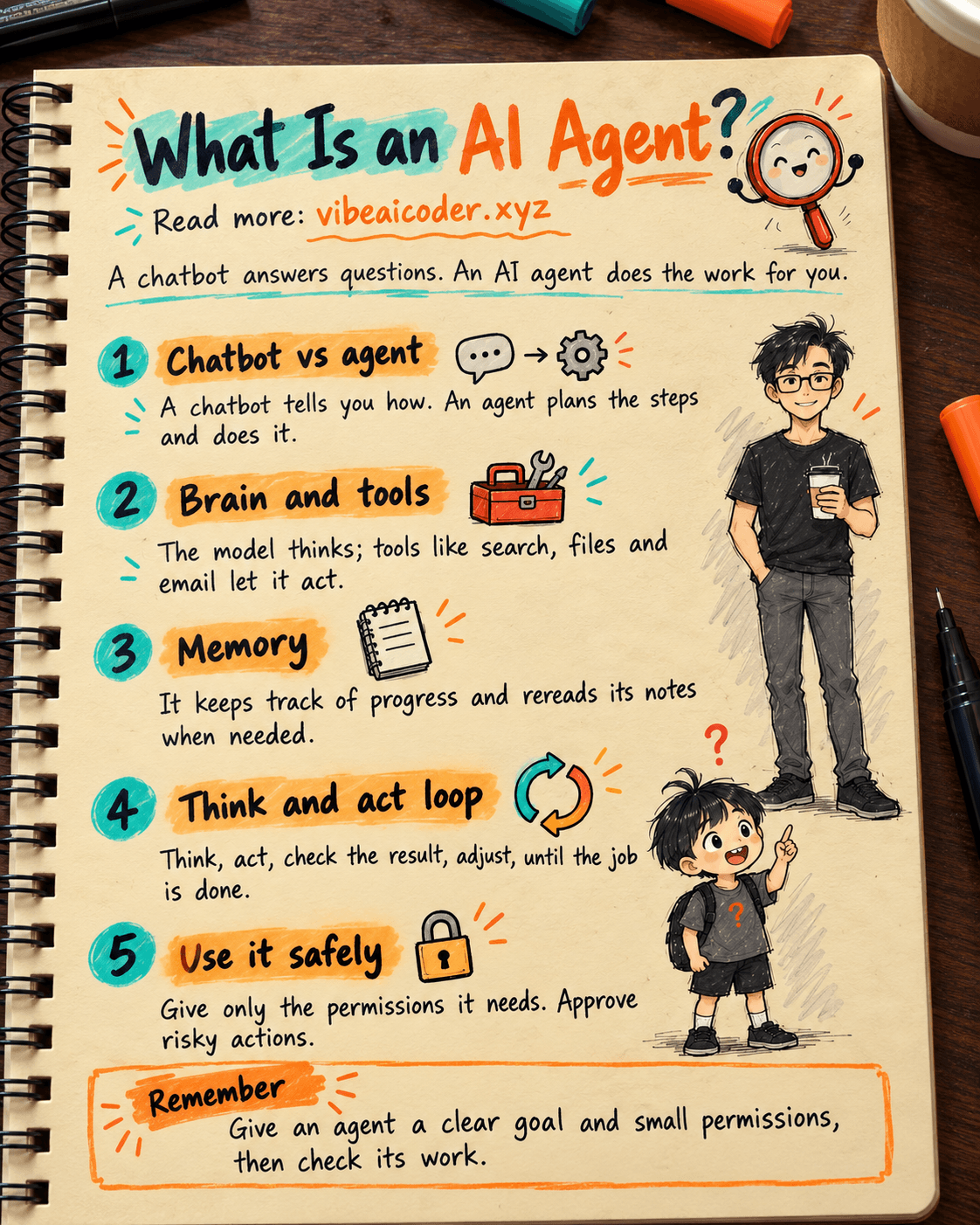
An AI agent is an AI that makes its own plan and uses tools to reach a goal, instead of just answering a question. You hand it a task, for example "find 5 beachfront hotels under $40 a night and put them in a comparison table", and it breaks the work into steps, looks things up, checks its own results and only then reports back. In short: a chatbot answers, an AI agent does the work.
 What is an AI agent?
Picture a new assistant on their first week. You only state the goal: "Get me ready for tomorrow morning's meeting." The assistant opens your calendar, gathers the documents, drafts an agenda and emails everyone a reminder. An AI agent works the same way, except it is software, and it has three traits:
- It has a goal: you give it a job to finish, not a question to answer.
- It decides how: it works out the steps and chooses what to do first.
- It uses tools: it can search the web, read files, run commands, send messages or update a spreadsheet.
Anthropic, the company behind Claude, draws a clear line between two kinds of systems. The first is a workflow: the AI follows steps that a person wrote in advance, so its behavior is predictable. The second is an agent: the AI decides the process itself, picks its own tools and steers its own work. You can read more in the post Anthropic's guide to building AI agents: simple beats complex.
The key point: an agent is not stronger than a chatbot because it has a different brain. It is stronger because it is allowed to take action and runs in a loop until the job is done.
 How is an AI agent different from a chatbot?
An AI agent is not just a "fancier" chatbot. The two work in different ways:
- Input: a chatbot gets a question. An AI agent gets a goal, usually a big one with many steps.
- Output: a chatbot gives back text. An AI agent gives back a real result: an edited file, a sent email, a finished report.
- Number of steps: a chatbot answers once and stops. An AI agent takes many turns in a row, and each step builds on the result of the one before.
- Tools: a chatbot usually relies only on what it already knows. An AI agent calls outside tools such as a browser, a spreadsheet, email or project management software.
- Who drives: with a chatbot, you steer every step. With an AI agent, you hand over the task and let it steer, and you only approve the important moments.
- Risk: when a chatbot is wrong, you read the mistake. When an AI agent is wrong, the mistake may already have happened, like deleting the wrong file.
Example: ask a chatbot "how do I rename 200 photos by the date they were taken?" and it walks you through the steps. Give the same job to an AI agent and it opens the folder, renames the files and tells you "done". A chatbot tells you how, an AI agent does it.
 What is an AI agent made of?
Most AI agents have four parts inside. You don't need to code to understand them.
1. The AI model: the brain
This is the "thinking" part, for example Claude, GPT or Gemini. The model reads the goal, understands the situation and decides the next step.
2. Tools: the hands
Tools are the things the agent is allowed to do: search the web, read and write files, send email, check a calendar. On its own, an AI model can only write text. Tools let it touch the real world.
Tools matter so much that Anthropic says it spent more effort tuning tools than tuning the overall prompt when building its coding agent. The post writing tools for AI agents: 5 principles Anthropic uses explains why a clearly described tool makes an agent work much better.
To connect agents to the software you already use, there is a shared standard called MCP (Model Context Protocol), often described as "a USB-C port for AI". See the post what MCP is and how Claude connects to all your tools.
3. Memory: the notebook
An agent needs to remember how far it has gotten and what it has already tried. There are two kinds of memory:
- Short-term memory: what the agent can "see" while it works. This space is limited: stuff too much into it and the agent starts missing things. Anthropic calls this "context rot".
- Long-term memory: notes or files stored outside, which the agent reads again when needed, like you checking your notebook.
Choosing what information goes into the agent's head, and when, is called context engineering. The post context engineering: the most important skill for building AI agents goes deeper on this.
4. The think and act loop: how it works
This is what makes it an "agent". It runs a loop:
- Think: what is the goal, and what should happen next?
- Act: call a tool, for example a search or opening a file.
- Look at the result: what did the tool return, and is it what was expected?
- Adjust: if the job isn't done, go back to step 1 with the new information. If it is done, report the result.
Thanks to this loop, an agent fixes its own mistakes: if a search finds nothing, it tries different keywords. If it hits an error, it reads the error and tries another way.
 Examples of AI agents at home and at work
Kinds of work agents can already do:
- Research: the agent searches many sources, cross-checks them and writes a report with citations, like Claude Research or Google Deep Research.
- Coding: Claude Code reads code, fixes bugs and runs tests by itself. You describe a feature in plain words and the agent handles the rest.
- Office work: summarizing email, drafting a weekly report, scheduling meetings. With MCP, you can tell Claude "put this month's revenue in column C" and it just does it.
- Customer support: the agent looks up orders, replies, and only hands off to a person for the hard cases.
- Background work like a real employee: AWS open-sourced Pizza Bot, an app that lets agents run long jobs in the background and report back through an inbox-style interface. The project once had more than 2,000 internal users at Amazon. Read more in AWS open-sources Pizza Bot: an AI agent that works in the background like a real employee.
The best jobs to give an agent are ones with many steps, that need tools, and whose results can be checked.
 Many agents working together
Some jobs are too big for one agent. Then people let several agents work together, which is called multi-agent.
The most common setup looks like a team: a lead agent takes the job, splits it into smaller parts, hands them to sub-agents that work in parallel, then combines the results.
Anthropic uses exactly this for Claude Research. According to the company, the multi-agent system did up to 90.2% better than a single agent on an internal research test, and running 3 to 5 sub-agents in parallel cut research time by up to 90%. The trade-off is that it uses about 15 times as many tokens (the unit AI cost is measured in) as a normal chat. The details are in how Anthropic built the multi-agent system behind Claude Research.
For coding, Claude Code has a feature called Agent Teams: one session acts as team lead, creates "teammates" and splits up the work, and the teammates even message each other directly to coordinate. For example, you can have 3 agents review the same code change from 3 angles: security, speed and testing. See Agent Teams: turn one developer into a whole AI team in Claude Code.
The lesson: more agents are not always better. They cost more and are more complex, so they are only worth it for big jobs.
 Risks, and how to use AI agents safely
Because they can take action, AI agents are riskier than chatbots. A 2026 report found that 65% of companies had a security incident involving AI agents, and 61% of those exposed real data. The main causes were permissions that were too broad, leaked passwords or access keys, and letting agents do sensitive work with no confirmation step. Read more in AI agents leaking data: 61% of companies hit by credential leaks.
Three rules help you use agents safely:
1. Permissions: give only what is needed
If an agent only needs to read files, let it read, not delete. For dangerous actions like deleting data, messaging customers or moving money, always turn on ask me first. Pizza Bot is a good example: you decide ahead of time which tools run freely and which must wait for you to click approve.
2. Data: be careful what you feed it
- Don't leave passwords, API keys or customer information anywhere an agent could leak them.
- Only install tools, "skills" or MCP connections from sources you trust. One research team scanned 17,022 third-party skills and found 520 with credential leak problems.
- For very sensitive data, consider a model that runs on your own computer.
3. Check the results: trust, but verify
An agent can get things wrong and still say "all done" with total confidence. So:
- Read the result before you use it, especially numbers and citations.
- Start with small jobs that can be undone before handing over big ones.
- Ask the agent to list the steps it took so you know what to double-check.
 How to start trying AI agents
You don't need to know how to code. Here is a path from easy to hard:
- Use a built-in deep research feature: try Claude Research or the deep research mode in the AI app you already use, and watch how the agent works on its own.
- Connect AI to familiar software: turn on the Google Drive, Gmail or Notion connection, then ask it to summarize email or find a document.
- Try an agent that works on your computer: use Claude Code to have an agent build a small website or tidy up a folder.
- Build a simple agent yourself: Anthropic's advice is to start very simple and only add complexity when the simple approach isn't enough.
Quick tip: when you hand over a task, state the goal, the limits and what "done" looks like. Instead of "find a hotel", write "find 5 beachfront hotels in Da Nang under $40 a night and return a list with links".
 Frequently asked questions
What is an AI agent, in one sentence? An AI agent is an AI that plans on its own and uses tools to finish a goal you give it, instead of only answering questions.
What is the most important difference between an AI agent and a chatbot? A chatbot answers once and stops. An AI agent takes many steps in a row, uses tools by itself and produces real results like files, emails or reports.
Are ChatGPT or Claude AI agents? By themselves they are AI models with a chat interface. When they have tools turned on and run in a self-directed loop, like Claude Code or deep research mode, they act as AI agents.
Can I use AI agents if I can't code? Yes. You can start with deep research or with connecting AI to Gmail and Google Drive, which are built into AI apps, without writing a single line of code.
Are AI agents safe to use? They are safe if you give them only the permissions they need, make them ask before doing anything risky, keep sensitive data out of reach and always check the results.
AI agents are the shift from "AI that talks" to "AI that works". Understand them today and you will know which jobs to hand them and how to use them safely.
More articles

Gemini 4 Argon Reads a 500-Page Chemistry Patent in One Afternoon

Claude Opus 5.5 Codes a Real Money Trading Game in One Day

What Is a Token in AI? Why ChatGPT and Claude Charge by Tokens

What Is Chain of Thought? Why Asking AI to Think Step by Step Works Better

Claude Sonnet 5.5 vs GPT-6.1 Sol: Which AI Model Is Worth Using?

 Claude Opus 5.5 Launches: 30% Faster, 40% Cheaper, Blocks AI Brain Copying