How to Pilot ChatGPT Enterprise with Clear Permissions and Measures
In about two hours of preparation, a CEO, team lead, and administrator can design a small ChatGPT Enterprise pilot with clear owners, permissions, and measures of success. You will need one workflow, approved documents, a list of participants, and a baseline for the work today. Your organization chooses how long the pilot runs.
OpenAI's Enterprise administration guide separates workspace permissions, local execution policies, Codex cloud, the API, plugins, connections, and permissions in the original data systems. This article turns that framework into a manageable pilot. Do not assume that Enterprise settings are available on other plans or in every ChatGPT Work session.
 Prepare
Open ChatGPT in your Enterprise workspace. An administrator should confirm which features and permissions are available. The team lead should pick a task with an output that people can check, such as a draft weekly report. Avoid starting with a task that lets AI send messages or edit customer records on its own.
Write down the problem, pilot team, business owner, permissions administrator, source documents, baseline measures, and stop conditions. Your organization chooses the number of people and weeks. The example with six employees and two weeks below is not an OpenAI requirement.
Before connecting a data source, read how to limit plugin access to company data. Agree on how to make requests using this guide to prompts with a clear goal.
 Step by step
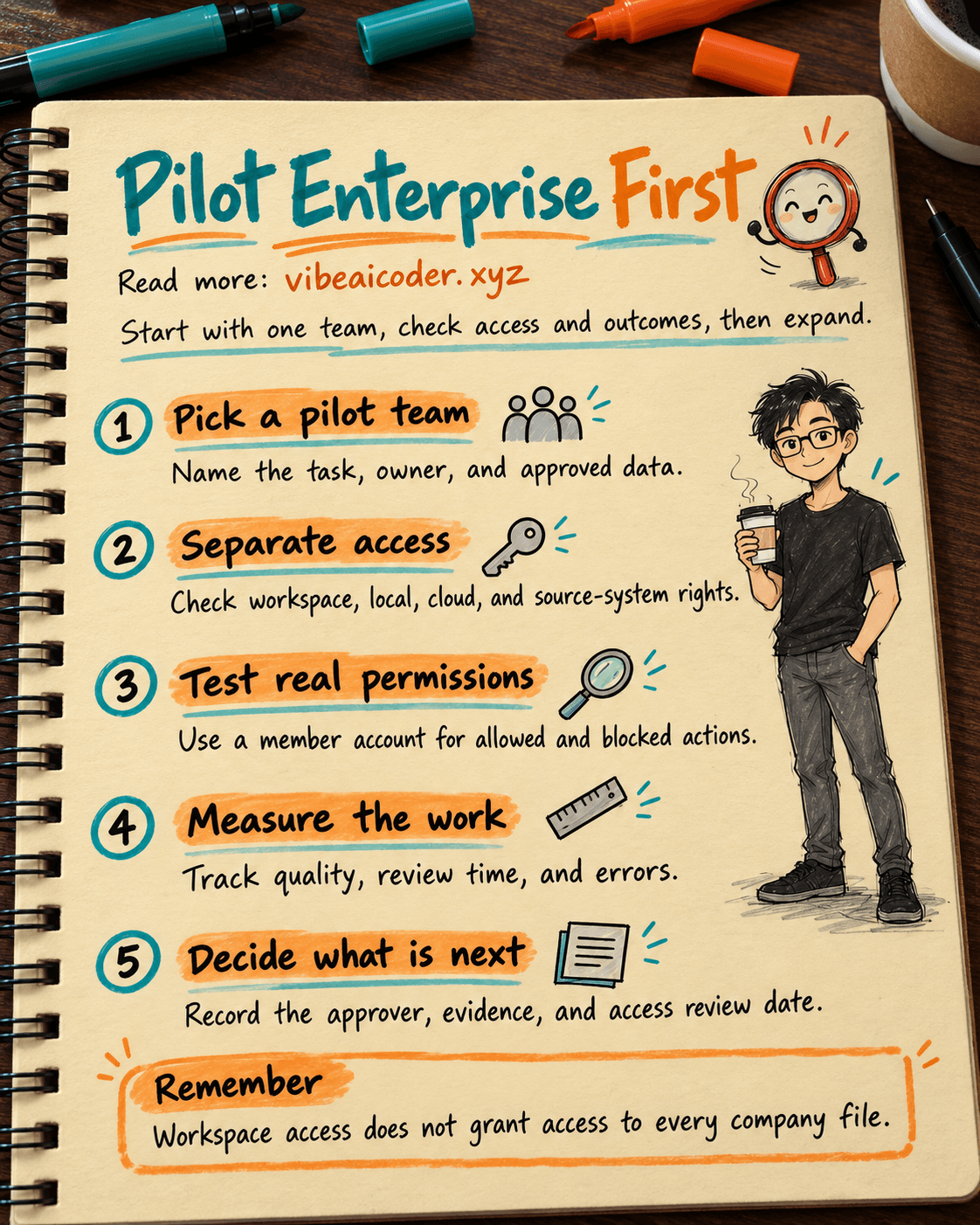
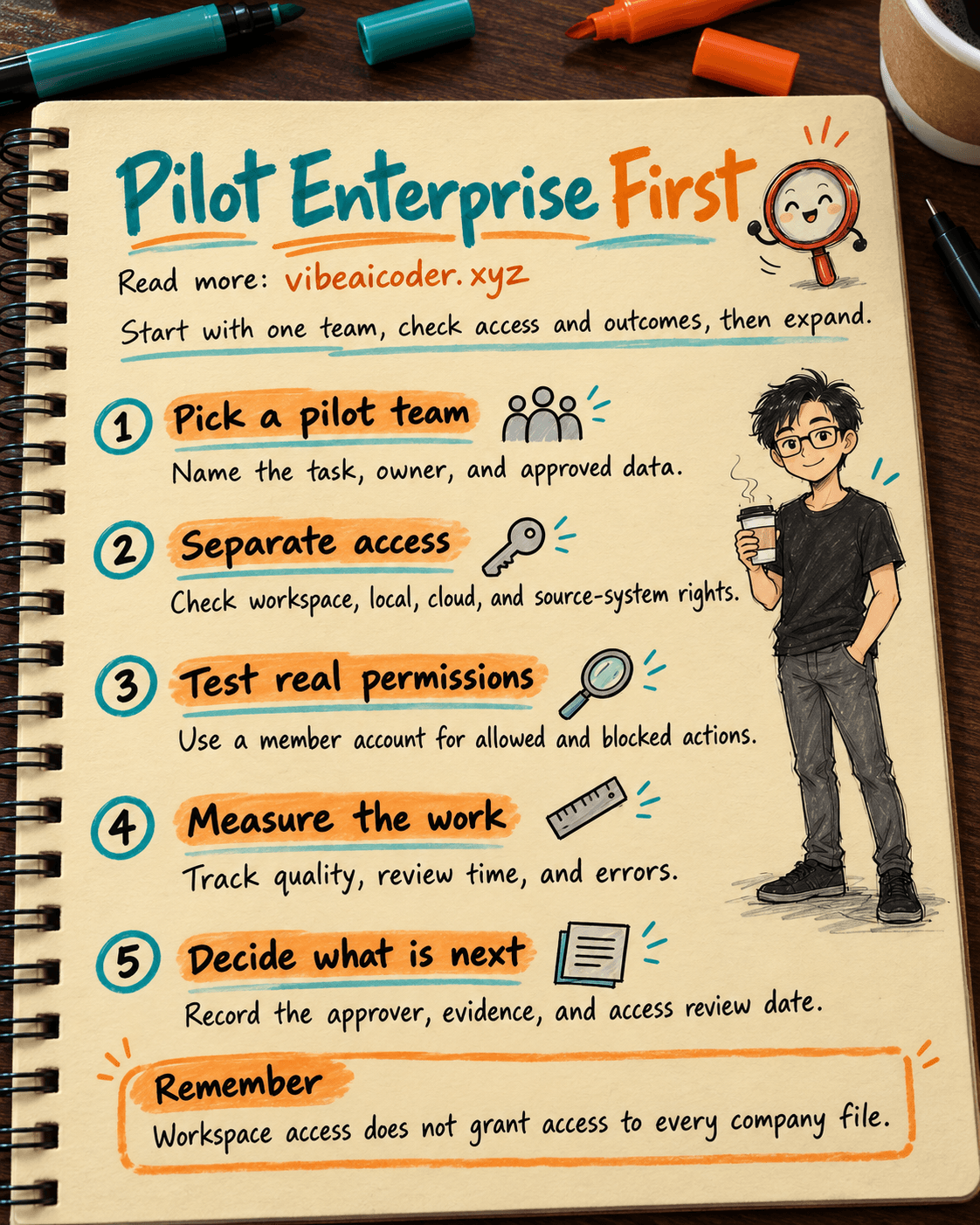
1. Choose one business outcome and name the owners
Ask: "Can the team produce [output] faster while maintaining [quality standard]?" Name the workflow owner, the ChatGPT permissions administrator, the administrator of the source system, and the person who will compile the measures. One person can hold more than one role, but the decision maker must be clear.
For example, a customer support team spends 45 minutes summarizing 20 tickets each week. It wants a draft that cites ticket IDs, takes less time to prepare, and does not miss important tickets.
You can ask ChatGPT to draft the pilot plan, but a manager must set its scope:
I am planning a ChatGPT Enterprise pilot for [team name] to perform [specific task].
The approved inputs are [document types], and the required output is [output].
Draft a one-page plan covering the business owner, workspace administrator, source-system administrator, output reviewer, user scope, excluded data, before-and-after measures, and stop criteria.
Flag any missing numbers or owners. Do not choose the number of users, the duration, or success thresholds for us.
2. Map permission boundaries before inviting users
OpenAI's guide does not describe permission as one switch. The first layer covers workspace members, groups, and roles. The second covers policies for local execution if the pilot uses the desktop app, Codex CLI, or an IDE extension. The third covers the Codex cloud environment if tasks run in the cloud. The fourth covers Platform API organizations and projects if the workflow calls an API with a key. The fifth covers plugins, connections, and permissions granted by the original service. Check the layers your pilot actually uses, and record the layers that remain disabled.
For a ticket-summary pilot, workspace membership and read access to an approved set of tickets may be enough. Do not grant administrator access to the entire team. Test with an ordinary member account: approved tickets should open, and out-of-scope documents should remain inaccessible.
If you use Codex cloud, check its access, environment, and repositories separately. Under OpenAI's current guidance, Codex Cloud is disabled by default for new Enterprise workspaces unless a prior configuration enabled it. A weekly reporting pilot does not need this branch.
3. Select a small, clean data set with clear access rights
Sample closed tickets and remove personal information that the task does not need. Record the original source, sampling date, and source owner. For a plugin or connection, check its source, owner, available actions, and permissions in the original application. Start with nonsensitive test data.
Do not expose an entire drive to summarize 20 tickets. If the right source is unclear, first audit the workflow and find its bottlenecks.
Make the request traceable:
Use only [approved ticket set] to draft a weekly report for [start date] through [end date].
For every important observation, cite the ticket ID or file name that supports it.
Separate the output into three parts: evidenced facts, interpretations to verify, and missing data.
Do not send the report, edit tickets, or access other sources.
If the evidence is insufficient for a conclusion, write a question for [reviewer].
4. Measure effort, quality, and risk on comparable work
Before the pilot, measure drafting time, revision time, missing citations, and errors that could affect a decision on similar tasks. During the pilot, use the same definitions. A faster draft may save nothing if it takes much longer to correct.
A small sample cannot establish results for the whole company. Compare ticket types and difficulty. Track permission, connection, and content errors separately. Review weak outputs as well as strong ones.
Keep a table with the date, task ID, worker, drafting minutes, revision minutes, content errors, permission errors, and review status. Do not copy sensitive customer data into that measurement table. OpenAI offers workspace analytics and audit records, but usage counts do not prove better work.
5. Test both permitted and blocked actions
An administrator and a representative member should try an approved task and a task outside the approved scope. If local tools are involved, check file access, network access, and approvals. For Codex cloud, check the environment and repositories. For plugins, check settings, sources, and actions.
Record the setting, tester, date, and result. If an action that should be blocked succeeds, stop that part of the pilot and fix the permissions. If an approved task is blocked, find the relevant permission layer instead of broadening access across the workspace.
6. Decide whether to expand, revise, or stop
At the end of the pilot, the business owner reviews time and quality; the administrator reviews permissions, cost, and incidents. Decide whether to expand, keep the scope and revise the process, or stop and revoke access. Assign someone to review permissions regularly.
Do not promise that every department will save the same number of hours. A different kind of task needs fresh measurement and a fresh permissions check.
 Example result
Imagine a company pilots report drafting with six customer support employees for two weeks. This is an illustrative example, not an OpenAI target. The team lead reviews quality, while the administrator grants read access only to the selected ticket set.
| Item | Pilot record |
|---|---|
| Task | Summarize 20 closed tickets in a draft report citing ticket IDs. |
| Baseline | 45 minutes to draft, 10 minutes for manager revisions, and no missing citations in the reviewed sample. |
| Pilot | 25 minutes to draft and 18 minutes for revisions; one observation without a ticket ID had to be removed from the final report. |
| Access | A member account could read the pilot tickets but not an out-of-scope folder. |
| Decision | Keep the scope, improve the prompt, and test more exception cases before expanding. |
Drafting took 20 fewer minutes, but total effort fell by only 12 minutes, and a citation error remained. That is why you must measure quality along with speed.
 Tips for a better pilot
Start with one workflow. When several departments pilot at once, permission and quality failures become harder to trace.
Write acceptance criteria before reviewing outputs. Define unacceptable errors, how to calculate time, and who reviews the work. Changing the criteria after seeing a few impressive examples will skew the evaluation.
Keep strong and weak examples. Missing citations and unusual tickets teach new participants what the quality standard actually means.
Assign a maintainer. Record when to review access, where current procedures live, and how to revoke access when someone leaves the team.
 Limits to know
ChatGPT can summarize incorrectly or present an inference as fact. A manager must read the sources and approve outputs that affect customers. A pilot does not replace security and data-governance procedures.
Enterprise capabilities depend on configuration and permissions. Granting access in ChatGPT does not automatically grant access to a code repository, ticket system, or API. When the interface changes, administrators should check the official guide and test again with a representative member account.
 FAQ
FAQ
Does the whole company need to join the pilot? No. Choose a group whose outputs can be checked. OpenAI does not prescribe a participant count.
How long should we wait before deciding whether to expand? Choose a period long enough to encounter routine work and exceptions. Two weeks is an example, not a standard duration.
Does ChatGPT Enterprise access let employees read every company file? No. Workspace permissions and permissions in connected applications or data stores are separate layers. Test approved and blocked access with a member account.
If the team only uses ChatGPT to draft reports, must we enable Codex cloud and the API? There is no reason to enable capabilities outside the pilot's task. Mark them out of scope and assess them separately if the team later needs them.
Do administrator usage counts prove the pilot's value? No. They show adoption. Measure drafting and revision time, citation errors, output quality, permission incidents, and reviewers' feedback on real tasks.
More articles
AI Training vs Inference: What Is the Difference?

Gemini 4 Argon Reads a 500-Page Chemistry Patent in One Afternoon

Claude Opus 5.5 Codes a Real Money Trading Game in One Day

What Is a Token in AI? Why ChatGPT and Claude Charge by Tokens

What Is Chain of Thought? Why Asking AI to Think Step by Step Works Better

Claude Sonnet 5.5 vs GPT-6.1 Sol: Which AI Model Is Worth Using?