What Is a Prompt? How to Write Effective Prompts for ChatGPT, Claude and Gemini (With Examples)
A prompt is the instruction or request you send to an AI like ChatGPT, Claude or Gemini to get it to do something: answer a question, write an email, summarize a document or make a plan. The clearer your prompt, the closer the AI gets to what you want. This guide explains what a prompt is, why the way you write it decides the quality of the answer, and gives you a 5-part formula with examples you can use right away.
 What is a prompt?
Imagine AI as a very talented new employee who knows nothing about you yet. It writes fast, reads fast and knows a lot. But it does not know who you are, what project you are working on or what you want the result to look like.
A prompt is the task brief you give that employee. It can be a short sentence like "Summarize this article", or a longer paragraph with full context, requirements and examples.
A few basics worth knowing:
- You can write prompts in any language. ChatGPT, Claude and Gemini all understand many languages well. Just write the way you talk.
- A prompt is not code. You don't need to learn programming to write good prompts. You just need to know how to explain a task clearly.
- One conversation has many prompts. Your first message is a prompt, and "can you make it shorter" in the next turn is also a prompt.
Writing prompts that work well is often called prompt engineering. It sounds grand, but in practice it is the skill of handing off work clearly, just like asking a coworker to do something for you.
 Why the way you write a prompt decides the result
AI cannot read your mind. It only sees the exact words you type. Wherever you leave a gap, the AI will guess. And it usually guesses the most common, most generic option.
Compare these two ways of asking:
Vague prompt: Write a post about coffee.
Clear prompt: Write a Facebook post of about 100 words for a small coffee shop in a mountain town, introducing our new egg coffee. Warm, friendly tone, ending with an invitation to come try it this weekend.
With the first one, the AI might write a long essay on the history of coffee around the world. With the second one, you get almost exactly what you need, with very little editing.
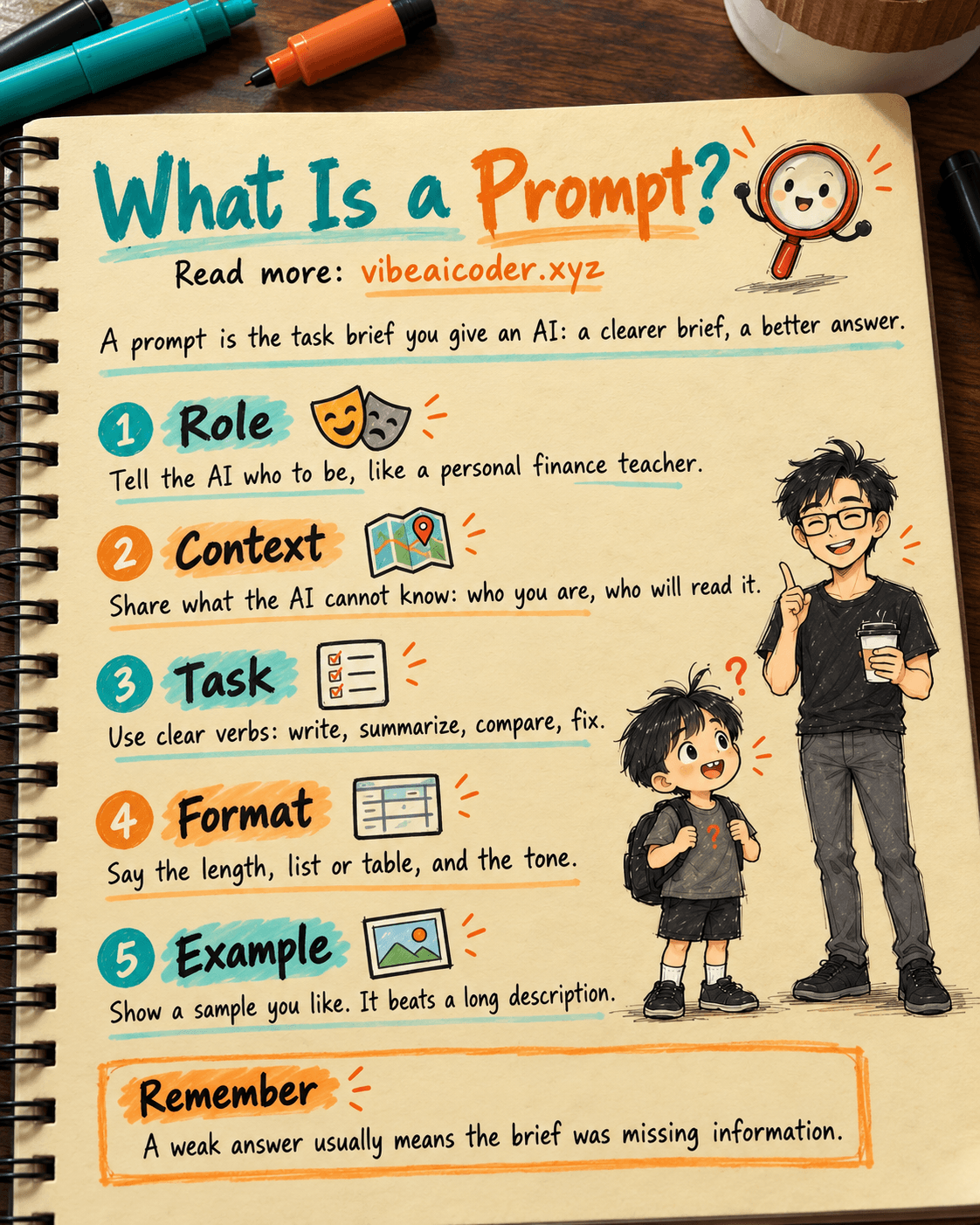
In short: a weak result usually does not mean the AI is bad. It means the brief was missing information. Writing good prompts saves you many rounds of back and forth.
 The 5-part formula for a good prompt
You don't always need all 5 parts. For small tasks, 2 or 3 parts are enough. For important tasks, the more complete, the better. Here is each part, with a before and after example.
1. Role: who should the AI be?
Telling the AI who it is helps it pick the right tone and level of detail.
Before: Explain compound interest.
After: You are a personal finance teacher for people who just started their first job. Explain compound interest in a very simple way.
2. Context: what is going on?
Context is information the AI cannot know on its own: who you are, who will read it and what situation you are in.
Before: Write an email asking for time off.
After: I'm an accountant and I need 3 days off to go home for my sister's wedding. My manager is quite strict, and the end of the month is busy because we are closing the books. Write an email asking for time off.
3. Task: exactly what needs to be done?
Use clear verbs: write, summarize, compare, list, fix, translate. Mention any limits too.
Before: Take a look at this paragraph for me.
After: Fix the spelling and grammar mistakes in the paragraph below. Keep the meaning and tone the same, and don't add new sentences.
4. Output format: what do you want back?
If you don't say, the AI will choose the layout itself. Be clear about length, list or paragraphs, and whether you want a table.
Before: Give me birthday gift ideas for my mom.
After: Give me 5 birthday gift ideas for my mom, with a budget under $50. Show them as a list, one idea per line, each with a short reason.
5. Example: show the AI a sample you like
This is the part most people skip, yet it works extremely well. One concrete example says more than a long description.
Before: Name the items on my shop's menu.
After: Name 5 fresh juices on my shop's menu. I like fun, memorable names like "Orange You Awake" or "Watermelon Chill Pill". Use a similar style.
Put all 5 parts together and a complete prompt might look like this:
You are a customer support agent for an online clothing store (role).
A customer is complaining because the delivery was 4 days late and wants to cancel the order (context).
Write an apology message and offer a 10% discount code for their next purchase (task).
Maximum 80 words, sincere tone, not too formal (format).
Use this tone as a reference: "We're truly sorry for keeping you waiting so long." (example)
 7 tips for writing effective prompts
-
State the end goal. Don't just say "what to do", also say "why". When the AI knows your email is meant to ask for a raise, it will choose very different words than for a regular check-in email.
-
Put the most important requirements at the start or the end of the prompt. AI tends to pay the most attention to the beginning and the end, and can miss information in the middle. The article Where you place information in a prompt matters more than what you write (in Vietnamese) explains this in detail.
-
Separate the material from the instructions. When you paste a long text, mark its boundaries clearly, for example "The content to summarize is between the two ### markers". Then repeat the main request on the last line.
-
Break big jobs into steps. Instead of "write my whole business plan", ask the AI for an outline first, review it yourself, and then have it write each section.
-
Say what to avoid. Lines like "no technical jargon", "no more than 200 words" or "don't make up numbers" tell the AI where the limits are.
-
Give specific feedback instead of saying "redo it". "Cut it in half", "remove the opening sentence" or "make it friendlier" work much better than "not good, write it again".
-
Let the AI ask questions. Add "If you are missing information, ask me before you start" at the end of your prompt. The AI will ask for what it needs instead of guessing.
These tips work for ChatGPT, Claude and Gemini alike. If you are still deciding which tool to use, see ChatGPT vs Gemini vs Claude comparison (in Vietnamese).
 Common prompt writing mistakes
- Asking too briefly and too generally. "Write an ad" without saying what product, for whom or where it will be posted. The AI will return something anyone could have written.
- Stuffing in too much unrelated material. Pasting a dozen pages when you only need one paragraph confuses the AI and makes it miss the main point.
- Mixing conflicting requests. "Make it very detailed but very short" leaves the AI unsure which one to prioritize.
- Trusting everything the AI writes right away. AI can be wrong with great confidence. For numbers, dates, legal or health information, always check against a reliable source.
- Giving up after the first answer. The first answer is just a draft. Two or three rounds of specific feedback usually produce a much better result.
- Explaining everything from scratch every time. If you often hand off the same kind of task, save a template prompt to paste in again, or use the tool's memory and custom instructions features.
 Prompt templates for everyday work
You can copy the templates below and replace the parts in square brackets with your own details.
 Writing an email
You are a professional office assistant. Write an email to [recipient] to [purpose].
Context: [short description of the situation].
Polite, clear tone, maximum 150 words. Put the email subject on the first line.
 Summarizing a document
Summarize the content between the two ### markers below for someone who has no time to read it.
Return: 1 sentence with the main idea, then the 5 most important bullet points, and finally any action items (if there are any).
###
[paste the content here]
###
Reminder: use only the information in the document, do not add anything.
 Making a plan
I want to [goal] within [time frame]. I have about [number of hours] free each day.
Make a week by week plan, with a small goal and 3 concrete tasks for each week.
Show it as a table. If the goal is not realistic, say so directly and suggest adjustments.
 Studying
You are a patient tutor. Explain [concept] to a complete beginner, using everyday examples.
Then give me 3 multiple choice questions to test myself, with the answers at the end.
If I answer wrong, explain it again in a different way.
 From prompts to context engineering
Once you are used to writing prompts, you will notice something: what shapes the result most is usually the background information you provide, not clever wording. The skill of preparing the right and complete information for AI is called context engineering.
The article Context engineering, the core skill for getting AI to do what you want (in Vietnamese) explains 5 kinds of information you should include. And Why context engineering is replacing prompt engineering (in Vietnamese) shows how to build a reusable context file. According to that article, this approach cuts the number of times you need to fix AI output by 70%.
If you use Claude Code for projects, the CLAUDE.md file is a kind of "prompt you keep using forever". See CLAUDE.md helps Claude remember everything from the start of a session and Karpathy's 4 rules in his CLAUDE.md file (both in Vietnamese) to get started.
 Frequently asked questions
What is a prompt? A prompt is the instruction or request you send to an AI such as ChatGPT, Claude or Gemini to get it to do something. It can be a question, a favor you ask or a detailed set of instructions.
Can I write prompts in languages other than English? Yes. Popular AI tools today understand many languages well. What matters is writing clearly and giving enough information, not which language you use.
Are long prompts better than short ones? Not necessarily. A good prompt has enough information, it does not have to be long. A short sentence with a clear role, task and format often beats a long, rambling paragraph.
Can I use the same prompt for ChatGPT, Claude and Gemini? Yes. The 5-part formula in this guide works for all three. Results may differ a little between tools, and one or two rounds of feedback are usually enough to get it right.
How do I stop AI from making things up? Ask the AI to use only the material you provide, allow it to say "I don't know" when information is missing, and always check important numbers against the original source yourself.
Next time you open ChatGPT, Claude or Gemini, why not add all 5 parts to your prompt and see how different the result is?
#Prompt #PromptEngineering #AI #ChatGPT #Claude #Gemini #VibeAICoder
More articles

Gemini 4 Argon Reads a 500-Page Chemistry Patent in One Afternoon

Claude Opus 5.5 Codes a Real Money Trading Game in One Day

What Is a Token in AI? Why ChatGPT and Claude Charge by Tokens

What Is Chain of Thought? Why Asking AI to Think Step by Step Works Better

Claude Sonnet 5.5 vs GPT-6.1 Sol: Which AI Model Is Worth Using?

 Claude Opus 5.5 Launches: 30% Faster, 40% Cheaper, Blocks AI Brain Copying