
How to Manage Your Claude Token Usage Limits Effectively
💳 Why you keep hitting "usage limit reached" right when Claude is on a roll
You ask Claude to write some code, polish an essay, or let Claude Code build an entire feature on its own, and suddenly the screen says you have hit your usage limit and need to wait a few hours before you can use it again. A recent video from the coding focused tech channel Theo, t3.gg, points out that most people paying for a Claude plan are wasting the biggest part of what they are paying for, simply because they do not understand how the usage limit actually works. Here is a plain language breakdown of what is worth knowing.
 Your Claude plan gives you more than you think
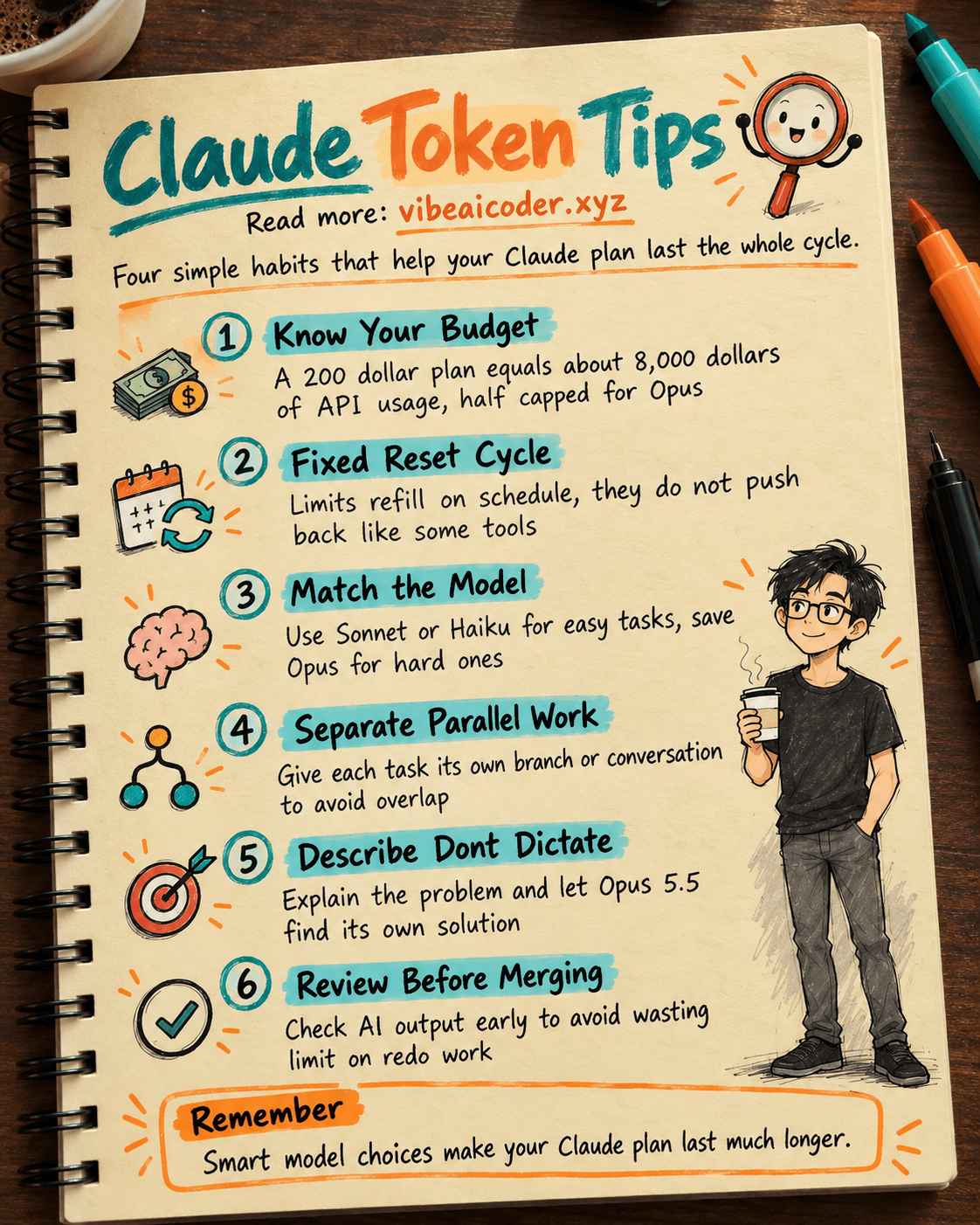
If you pay as you go through the API (the way developers pay to have their software call Claude directly), every time the AI reads or writes text it gets billed by tokens (a small chunk of text, which can be a whole word or part of one). According to the video, a $200 a month Claude subscription (the top tier plan) gives you roughly $8,000 worth of tokens if you priced it at the regular API rate. In other words, if you actually use the full capacity, a subscription is far cheaper than paying per request.
There is one catch worth knowing: out of that $8,000 worth of usage, only about $4,000 can go toward Opus, the strongest Claude model, because Anthropic caps Opus usage at half of your plan's total limit. You can still use the rest, just with lighter models like Sonnet. Understanding this makes it a lot less confusing when you see your limit drop faster than expected.
 How the usage limit actually "refills"
One common misunderstanding: when your usage limit resets, Claude does not push the schedule back a week, it simply refills your allotted percentage on the same fixed schedule as before. This is different from some other AI tools (OpenAI's Codex, for example), where hitting the limit pushes the next reset date a full week later. That means with Claude, you can plan around a fixed, predictable cycle instead of worrying about the reset date drifting.
 4 tips to get the most out of your Claude plan
1. Know which tasks need the strongest model and which do not. Opus is the most powerful model, but it also burns through your usage limit the fastest. For simple tasks like fixing typos, summarizing short text, or answering everyday questions, Sonnet is more than enough, and it is faster too. Save Opus for genuinely complex work: building a large feature from scratch, analyzing multiple files at once, or problems that require many steps of reasoning. For even lighter tasks, like quick summaries, sorting messages, or extracting information, you can switch to Haiku 5.5, which costs a fraction of Sonnet and still gets the job done.
2. If you let the AI run several tasks at once, keep them separated. A lot of people use Claude Code to work on multiple things in parallel, say, tweaking the interface while also building a new feature. According to the video, the safe approach is to isolate each task into its own working branch (called a work tree on GitHub) so one task does not accidentally overwrite another. If you are not technical, the simple takeaway is: do not hand several big tasks to one single conversation, open a new conversation for each one instead.
3. Describe the problem, do not hand over the solution. One of the better tips from the video: instead of telling the AI "change this line of code to that line" (meaning you already worked out the fix yourself and just want the AI to retype it), describe the problem you are trying to solve and let the AI figure out how. It sounds backwards, but this usually produces better results, because today's AI, especially the newly released Claude Opus 5.5, is capable enough to reason out a sensible approach on its own rather than just typing what you tell it. Earlier versions of Opus were weaker and often needed to be walked through every step, but Opus 5.5 has improved noticeably and now performs nearly as well as Sonnet on parallel tasks.
4. Review carefully before and after merging results. When you let the AI handle several tasks on its own, do not blindly trust everything it produces. Review what the AI just did before letting it continue, and check again before merging it into your main work. This costs a few extra minutes, but it saves you from burning your usage limit redoing work from scratch.
 Why this matters
Plenty of people use Claude AI or Claude Code every day without ever thinking of their usage limit the way they would think about a budget. Just like choosing home WiFi over mobile data for a big download, picking the right model for the right task lets you get more done on the same plan without upgrading to a pricier tier. If you keep running out of Claude usage faster than expected, try these tips before you consider switching plans. For more ways to save tokens while coding with AI, see 4 ways to use Jev to code faster with AI without burning through tokens.
More articles

Gemini 4 Argon Reads a 500-Page Chemistry Patent in One Afternoon

Claude Opus 5.5 Codes a Real Money Trading Game in One Day

What Is a Token in AI? Why ChatGPT and Claude Charge by Tokens

What Is Chain of Thought? Why Asking AI to Think Step by Step Works Better

Claude Sonnet 5.5 vs GPT-6.1 Sol: Which AI Model Is Worth Using?

 Claude Opus 5.5 Launches: 30% Faster, 40% Cheaper, Blocks AI Brain Copying