What Is a Context Window? Why AI Suddenly Forgets Mid-Conversation
 What Is a Context Window? Why AI Suddenly "Forgets" Mid-Conversation
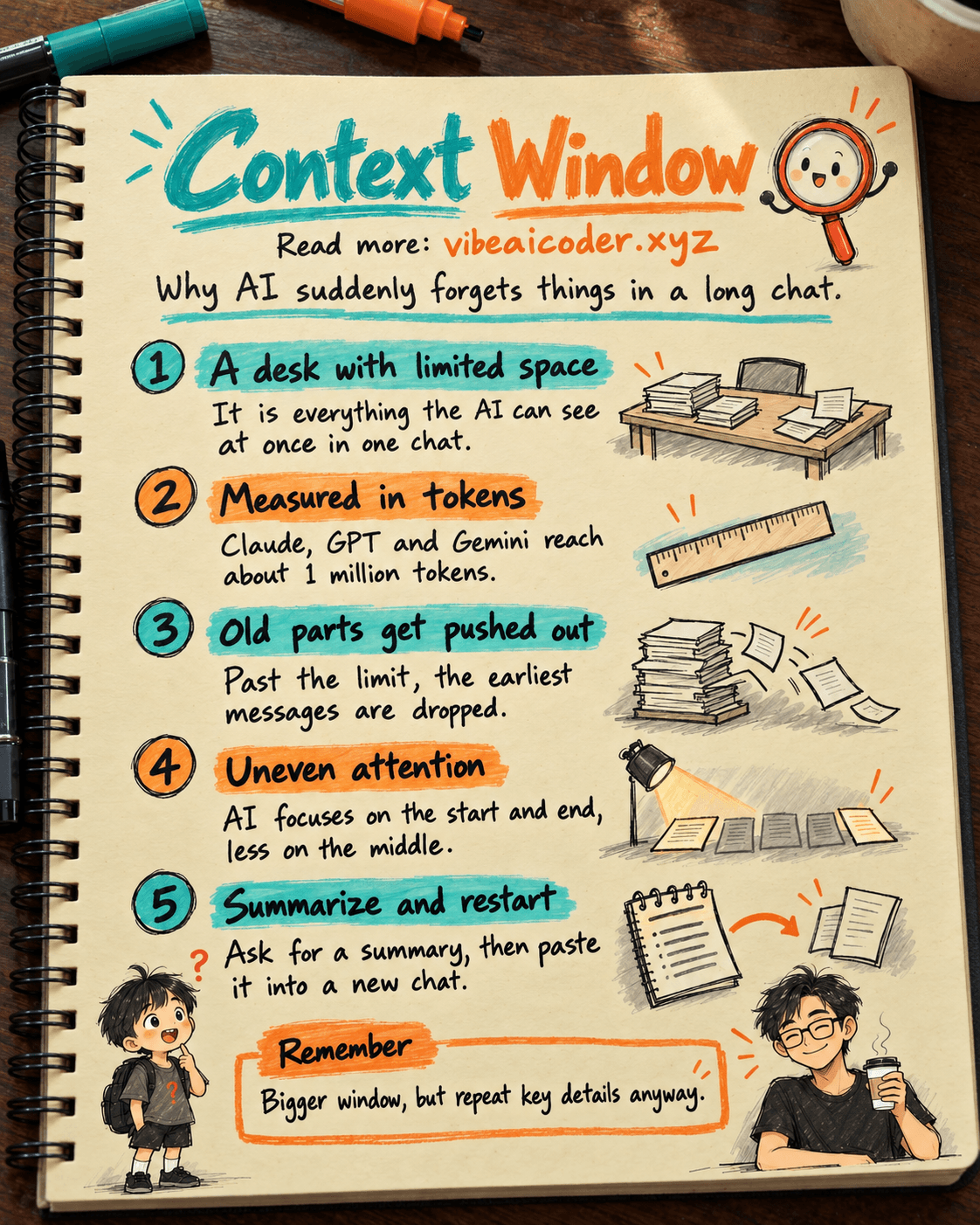
A context window is the maximum amount of text an AI like Claude, ChatGPT, or Gemini can "see" at once during a conversation, including everything you've typed so far and everything it has replied. Think of it as the AI's short-term memory for that session: once you go past the limit, the oldest parts get pushed out and the AI simply stops remembering them.
If an AI you were chatting with ever answered off-topic, forgot a detail you mentioned earlier, or lost track of a character name you introduced dozens of messages ago, there's a good chance the conversation hit its context window limit. This article explains the idea in plain terms.
 Think of it as a desk with limited space
Picture the AI sitting at a desk. Every message in the conversation, yours and the AI's, gets placed on that desk so the AI can read it and respond. The desk has a fixed size. Once papers (messages) pile up and fill the desk, the oldest ones have to be cleared away to make room for new ones.
The context window is the size of that desk. A bigger desk means the AI can hold more content at once: longer conversations, longer documents, more files processed together without losing track of the beginning.
One key point: the context window only exists for a single session. It is not the AI's long-term memory across days (some products, like Claude, have added a separate feature to remember across multiple chats, but that's a distinct capability, not what a context window is).
 How big are context windows right now
Context windows are measured in tokens, not characters or words. A token is the small unit AI models use to break text apart before processing it.
As of 2026, leading AI models have context windows far larger than just a few years ago:
- Claude (both Sonnet and Opus): around 1 million tokens via the API, roughly equivalent to several thousand pages.
- Newer GPT models: also around just over 1 million tokens.
- Gemini: some versions reach 1 to 2 million tokens, even higher in specialized variants.
To put that in perspective, 1 million tokens is roughly 700,000 to 750,000 English words, enough to fit nearly entire multi-volume novels into a single prompt. That said, most free chat apps you use daily (the Claude.ai web app, ChatGPT, Gemini) often cap the usable context window lower than the model's theoretical maximum, simply to control running costs. The full limit is usually only available through the API or higher-tier paid plans.
😵 Why AI still "forgets" even with a million-token window
A bigger window doesn't guarantee perfect recall. There are three reasons you can still run into this:
- The desk still has a limit. If you paste in a long document, add a few more files, and keep chatting for hundreds of messages, the total token count can still exceed the ceiling. At that point, the earliest parts of the conversation get dropped to make room.
- More memory doesn't mean equal attention. AI models tend to pay closer attention to the beginning and end of the context window; content in the middle, especially in very long contexts, sometimes gets processed less carefully. This is a real technical limitation, not the AI being careless.
- The chat interface may impose its own cap to control costs, as mentioned above, so a web conversation can be cut shorter than the model's theoretical limit.
In short, the context window determines how much an AI can see, but it doesn't guarantee the AI will use every part of it equally well.
 Tips for working around context limits
A few simple habits help you get more out of Claude, ChatGPT, or Gemini:
- Summarize before continuing. If a conversation has gotten very long, ask the AI to summarize the key points you've agreed on, then start a fresh conversation and paste that summary in. This frees up the context window.
- Break large tasks into steps. Instead of pasting a massive document and asking dozens of questions at once, work through it piece by piece. This saves tokens and helps the AI focus better on what you actually need.
- Repeat important details in long conversations, like names, goals, or key numbers, instead of assuming the AI still remembers them.
- Write clear, focused questions so the AI doesn't have to sift through irrelevant context to find what you need.
If you're working with an "agent" style AI that automates multiple steps (calling tools, browsing the web, editing files), the context window matters even more, since every intermediate step also takes up space in that window.
 Does Claude's cross-chat memory mean a bigger context window?
Claude recently added a feature that remembers details across multiple conversations, without you having to repeat context every time you open a new chat. This is not simply a bigger context window, it's a separate mechanism that lets Claude save and recall information from previous sessions, more like notes kept outside the desk rather than a bigger desk.
 Frequently Asked Questions
Is a context window the same as an AI's long-term memory? No. A context window only exists within a single conversation session. When you open a new chat (unless the product has a separate memory feature), everything in the old window is gone and the AI starts fresh.
Does a bigger context window make an AI "smarter"? Not necessarily. A larger window lets an AI handle more content at once, but how well it reasons and understands intent depends on the quality of the model itself, not just the size of its window.
Why do many free chat apps cap the context window lower than the underlying model allows? Because processing more tokens costs more computing power, so many free or lower-tier products limit conversation length to control running costs.
Can I paste an entire book into an AI? In theory, with a context window around 1 million tokens, yes. In practice it depends on the platform you're using, and the AI may still pay uneven attention across a very long middle section.
How do I know I'm about to run out of context window? Most consumer chat interfaces don't show you a running token count. The clearest sign is when the AI starts forgetting details from early in a long conversation, that's the cue to summarize and start fresh.
More articles

Gemini 4 Argon Reads a 500-Page Chemistry Patent in One Afternoon

Claude Opus 5.5 Codes a Real Money Trading Game in One Day

What Is a Token in AI? Why ChatGPT and Claude Charge by Tokens

What Is Chain of Thought? Why Asking AI to Think Step by Step Works Better

Claude Sonnet 5.5 vs GPT-6.1 Sol: Which AI Model Is Worth Using?

 Claude Opus 5.5 Launches: 30% Faster, 40% Cheaper, Blocks AI Brain Copying