 Write Claude Code skills like Anthropic: 9 kinds of skills and 9 hard-won lessons
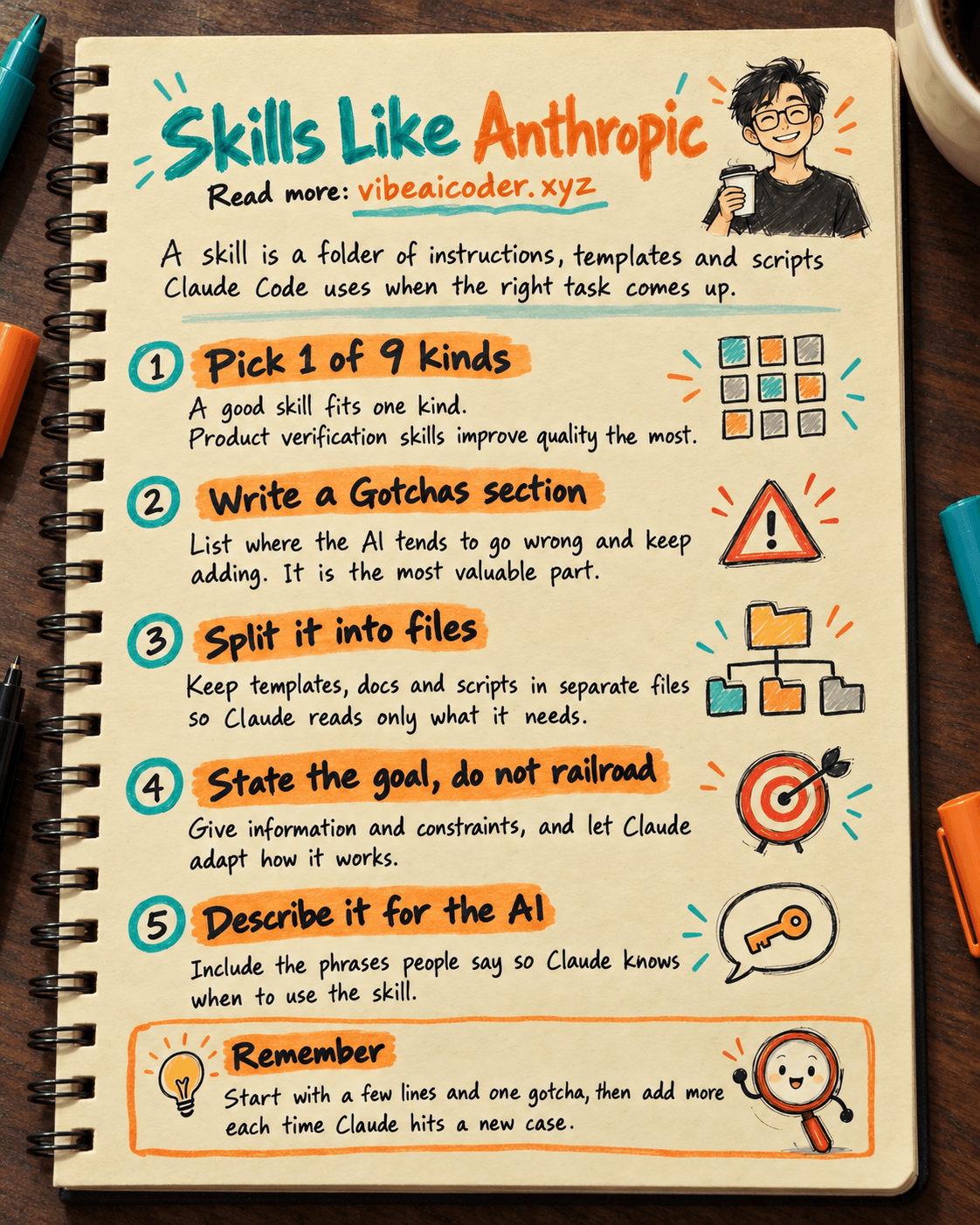
A skill in Claude Code is a folder of instructions, scripts and resources that the AI finds and uses on its own when the right task comes up. The Claude Code team at Anthropic uses skills every day, and Thariq Shihipar (Anthropic) shared how they do it in "Lessons from building Claude Code: How we use skills" on claude.dev. This post sums up the 9 kinds of skills they write and 9 lessons that make a skill actually useful. Reading time: about 15 minutes.
If you don't know what a skill is yet, read what Claude Skills are and what Claude Code is first (both in Vietnamese).
What you need
- Claude Code installed (free to install, needs a paid Claude plan or an API account to use).
- A task you repeat: posting a weekly report, checking a website after a change, pulling sales numbers...
- A
.claude/skills/folder in your project, with one subfolder per skill containing aSKILL.mdfile.
The most common misconception, according to the post: a skill is not just a markdown file. It is a whole folder that can hold scripts, templates and data for the AI to read and use.
 Step by step
Step 1: Pick the right kind of skill
Anthropic sorts its skills into 9 kinds. A good skill fits cleanly into one kind. A skill that spans several confuses the AI.
- Library and API reference: how to use a library or command-line tool correctly, with the usual traps.
- Product verification: how to test that the product works. According to the post, this kind has had the most measurable impact on Claude's output quality inside Anthropic.
- Data fetching and analysis: connects to where the numbers live, with how to query them.
- Business process and team automation: for example posting a standup update or writing a weekly recap.
- Code scaffolding and templates: sets up the starter skeleton for a type of app.
- Code quality and review: keeps the team's coding standards.
- CI/CD and deployment: fetches, pushes and deploys code.
- Runbooks: takes a symptom (an alert, an error message) and writes a structured investigation report.
- Infrastructure operations: routine maintenance, with guardrails before anything destructive.
Non-coders usually start with kinds 3, 4 or 8.
Step 2: Don't state the obvious
A skill should contain what pushes Claude beyond its default behavior. For example, Anthropic's frontend design skill exists to pull Claude away from familiar patterns like the Inter font and purple gradients.
Step 3: Write a "Gotchas" section
The post calls this the highest-signal content in any skill: the places where the AI tends to go wrong, added over time. The example in the post: the subscriptions table is append-only, so the row you want is the one with the highest version, not the most recent one.
## Gotchas
- [What the AI tends to get wrong] → [The right way]
- [Field named differently in two systems] → [Which field is correct]
Step 4: Split it into files, read only when needed
Don't cram everything into one file. Put templates in assets/, reference docs in references/, scripts in scripts/, and let SKILL.md point Claude to the right file when it needs it. This is called progressive disclosure: the AI only reads what is relevant, which saves working memory.
Step 5: State the goal, don't railroad
Instead of listing six exact git commands, the post suggests stating the goal, for example: "Cherry-pick the commit onto a clean branch. Resolve conflicts preserving intent." Give information and constraints, but leave Claude room to adapt.
Step 6: Think through setup
Store configuration (which Slack channel, which data table) in the skill's config.json. If it is missing, have Claude ask the user with clear options.
Step 7: Write the description for the AI, not for humans
The description is not a summary. It is what Claude reads to decide whether to use the skill, so include the phrases people actually say. The example from the post:
description: Monitors a PR until it merges.
Trigger on "babysit", "watch CI", "make sure this lands".
Step 8: Help Claude remember, and reuse scripts
- An append-only log file (for example in the folder the
${CLAUDE_PLUGIN_DATA}variable points to) lets Claude remember what it did last time. - Ship helper functions inside the skill, with gotchas noted in their docstrings, so Claude composes them instead of rewriting boilerplate.
Step 9: Add guardrails only when the skill is called
A skill can turn on hooks (automatic checks) only while it is in use. Anthropic's examples: /careful blocks destructive commands during production work, and /freeze restricts edits to specific folders.
 Sample result
A tidy "weekly report" skill might look like this:
.claude/skills/weekly-report/
├── SKILL.md          # goal, main steps, Gotchas
├── config.json       # where to send the report, which data table
├── references/
│   └── metrics.md    # what each metric means
└── assets/
    └── template.md   # report template
The description in SKILL.md: "Write the weekly report from sales data. Use when the user says 'weekly report', 'week summary', 'weekly recap'." The Gotchas section says: "Revenue is counted by payment date, not order date."
 Tips for better results
- Start small. The post concludes that most of their best skills began as a few lines and a single gotcha, then got better as people kept adding to them whenever Claude hit a new edge case.
- Share it the right way. Small teams keep skills in the repo (
.claude/skills). Larger teams build a plugin marketplace so each person installs what they need. - Measure which skills get used. Anthropic logs skill usage with a hook to see which skills are popular and which trigger less than expected.
- Read CLAUDE.md, the instruction sheet that helps Claude remember to decide what belongs in CLAUDE.md and what should become a skill.
 Limits to know
- A skill does not replace your own checks. Especially skills that deploy code or delete data: always keep a confirmation step.
- Don't keep passwords or API keys in skill files if the folder is shared or pushed to GitHub.
- Someone else's skill runs with the same access as Claude Code on your machine. Only install skills from sources you trust.
- Skill practices are still changing. The post itself says best practices are still evolving.
 FAQ
FAQ
How is a skill different from CLAUDE.md? CLAUDE.md is read at the start of every session, so keep it short. A skill is loaded only when the matching task comes up, so it can hold long instructions, templates and scripts without crowding the AI's memory.
Can non-coders write skills? Yes. A basic skill is just a text file with the goal, the main steps and the common traps. You can ask Claude Code itself to draft the skill and then edit it.
Which kind of skill should I write first? According to the post, product verification skills improve quality the most. For content or operations people, a skill for a weekly repeated task is the easiest start.
Why doesn't Claude use my skill on its own? Usually because the description reads like a summary for humans. Add the phrases people say when they need that task.
Where does this come from? From "Lessons from building Claude Code: How we use skills" by Thariq Shihipar on claude.dev, where Anthropic's developers share tips and lessons.
More articles

Gemini 4 Argon Reads a 500-Page Chemistry Patent in One Afternoon

Claude Opus 5.5 Codes a Real Money Trading Game in One Day

What Is a Token in AI? Why ChatGPT and Claude Charge by Tokens

What Is Chain of Thought? Why Asking AI to Think Step by Step Works Better

Claude Sonnet 5.5 vs GPT-6.1 Sol: Which AI Model Is Worth Using?

 Claude Opus 5.5 Launches: 30% Faster, 40% Cheaper, Blocks AI Brain Copying