 Context engineering for Claude 5: 6 new rules after Anthropic cut 80% of the system prompt
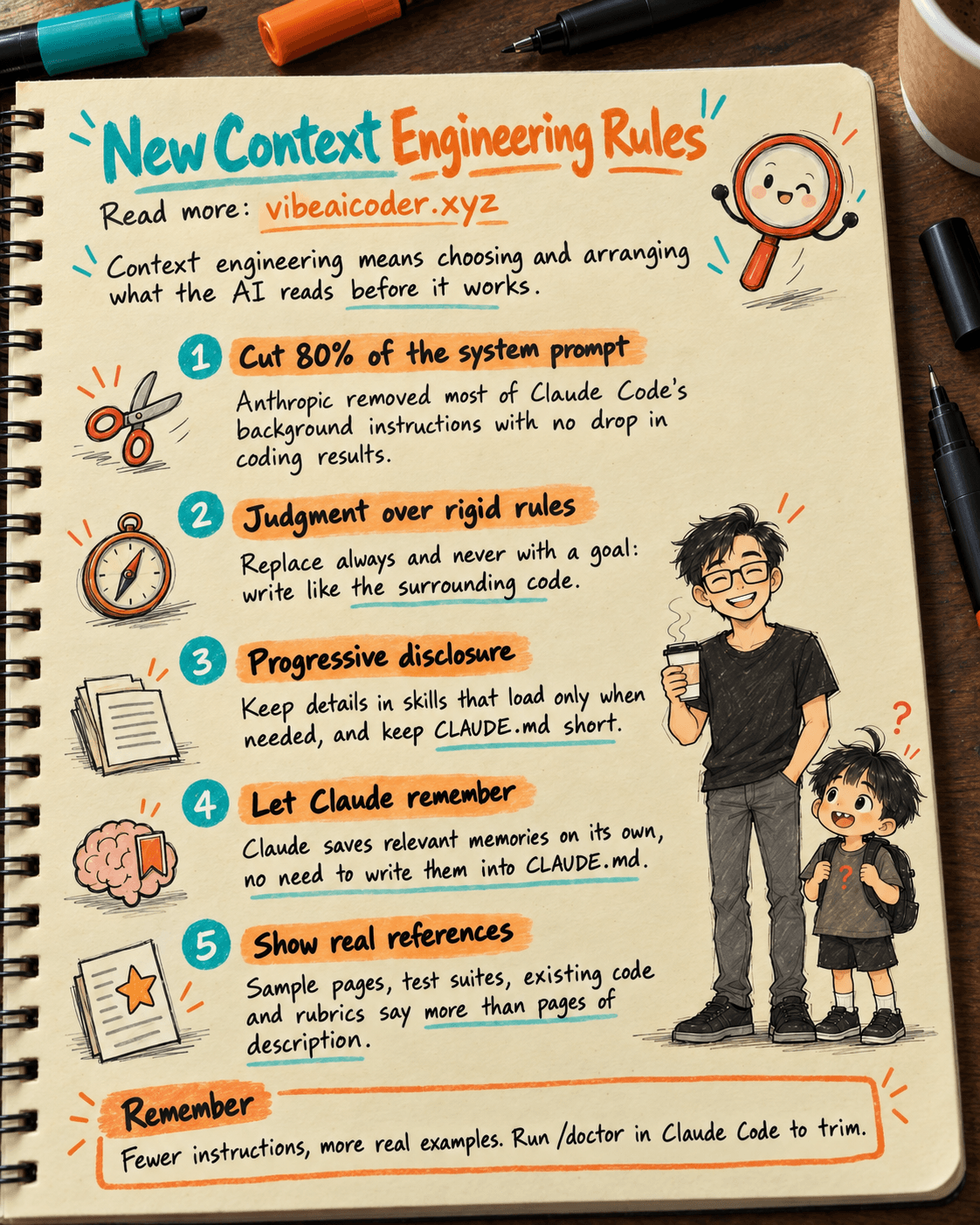
Context engineering means choosing and arranging what the AI gets to read before it works: your message, the documents you attach, the standing instructions, skills and memory. With the Claude 5 generation of models, the rules have changed. According to "The new rules of context engineering for Claude 5 generation models" by Thariq Shihipar (Anthropic) on claude.dev, the Claude Code team removed over 80% of Claude Code's system prompt (its background instructions) for models like Claude Opus 5, without a measurable drop on their coding evaluations.
This post explains why fewer words work better, and the 6 new rules you can apply today. If the concept is new to you, first read context engineering, the core skill for getting AI to do what you mean and what a prompt is (both in Vietnamese).
An everyday analogy
Think about giving work to two people. A new hire needs a thick handbook: "never do A, always do B, if C happens do D". An experienced colleague is different: hand them that same handbook and they waste time weighing rules that overlap and clash. For them, you state the goal, show an example of good work, and let them use their judgment.
Claude 5 generation models are like the experienced colleague. The post calls removing excess instructions "unhobbling Claude". Its example: the system prompt said "leave documentation as appropriate" while a skill said "DO NOT add comments". Two clashing instructions made Claude deliberate for nothing.
 How it works
The post describes a "context stack" of 4 layers, from top to bottom:
- Your prompt: the request you type, plus the files you mention or attach.
- References: specs, mockups, existing code, artifacts.
- System prompt: the product's background instructions (you don't see it in Claude Code, but you write your own if you build an AI agent).
- CLAUDE.md, skills and memory: what Claude carries between sessions.
On top of that come 6 new rules, each replacing an old habit:
- Give Claude judgment, not rules. Old: "default to writing no comments, never write multi-paragraph docstrings". New: "write code that reads like the surrounding code: match its comment density, naming, and idiom".
- Design interfaces, not just examples. The TodoWrite tool description used to be about 9,100 characters of when-to-use lists and worked examples. Now it lists three statuses (pending, in progress, completed) and one rule: only one task in progress at a time.
- Use progressive disclosure, not everything up front. Detailed guidance moves into skills that load only when needed. Tool definitions also load lazily through ToolSearch. CLAUDE.md can be split into files across folders.
- Keep tool descriptions short, without repetition. Remove instructions duplicated between the system prompt and tool descriptions, and put usage guidance in the tool definition itself.
- Let auto-memory work instead of saving to CLAUDE.md by hand. Users used to press
#to save to CLAUDE.md. Now Claude automatically saves memories relevant to the work and to you. See auto memory in Claude Code. - Give rich references, not simple specs. A sample HTML page, a test suite or an existing function says more than pages of description. The post says specs may be "detailed test suites, or a function in a different codebase". Add rubrics (scoring criteria) so verifier agents know what "good" means by your standards.
 What this means for you
- Make CLAUDE.md shorter. The post advises keeping it light and focused on project-specific gotchas, not the obvious. For example, instead of ten lines of "always, never", write: "Revenue is counted by payment date, not order date." See CLAUDE.md, the instruction sheet that helps Claude remember.
- Turn rules into goals. Replace "DO NOT write long sentences" with "Write for beginners: short sentences, one idea each."
- Show, don't describe. Want a web page like your old one? Attach the old page instead of describing colors and layout. Want a report in a set format? Share one good past report.
- Clean up with the built-in command. According to the post, these practices are now in
claude doctor: run/doctorin Claude Code to rightsize your skills and CLAUDE.md files.
 Common misconceptions
- "Longer instructions make the AI more accurate." With new models, redundant and conflicting instructions make the AI slower and more confused. Anthropic cut over 80% of its background instructions without losing performance.
- "Context engineering is only for people building AI agents." Everyone who uses Claude does it: every time you choose which file to attach, what to write in CLAUDE.md, or which skill to keep.
- "Dropping rules means the AI does whatever it wants." You don't drop everything. You still give goals, key constraints and reference material. What goes are the obvious, repeated or contradictory instructions.
 FAQ
FAQ
How is context engineering different from prompt writing? A prompt is the message you type once. Context engineering arranges everything the AI reads: prompt, references, system prompt, skills, memory. The prompt is just the top layer.
Do these rules apply to ChatGPT or Gemini? The post is specifically about Claude 5 generation models. The general idea (fewer rules, more real examples) often suits other strong models too, but test it yourself.
Should I trim my CLAUDE.md right away? Review it: drop lines Claude already gets right, drop duplicates, keep project-specific gotchas. The /doctor command in Claude Code can help.
What is a rubric and when should I use one? A rubric is a set of scoring criteria, such as "what a good API design looks like". It helps when quality depends on taste, so Claude and its verifier agents share one standard.
Where does this come from? From "The new rules of context engineering for Claude 5 generation models" by Thariq Shihipar on claude.dev (July 24, 2026), where Anthropic's developers share tips and lessons.
#ContextEngineering #Claude #ClaudeCode #PromptEngineering #AIAgent
More articles

Gemini 4 Argon Reads a 500-Page Chemistry Patent in One Afternoon

Claude Opus 5.5 Codes a Real Money Trading Game in One Day

What Is a Token in AI? Why ChatGPT and Claude Charge by Tokens

What Is Chain of Thought? Why Asking AI to Think Step by Step Works Better

Claude Sonnet 5.5 vs GPT-6.1 Sol: Which AI Model Is Worth Using?

 Claude Opus 5.5 Launches: 30% Faster, 40% Cheaper, Blocks AI Brain Copying