Use Codex Worktrees for two parallel tasks with separate checks
You are editing the checkout page but need Codex to fix a bug on the contact page. In about 30 to 45 minutes, you can open two working copies, test each one, and move the changes to the appropriate place. You need a Git project, ChatGPT desktop with Codex, and permission to run the project's tests.
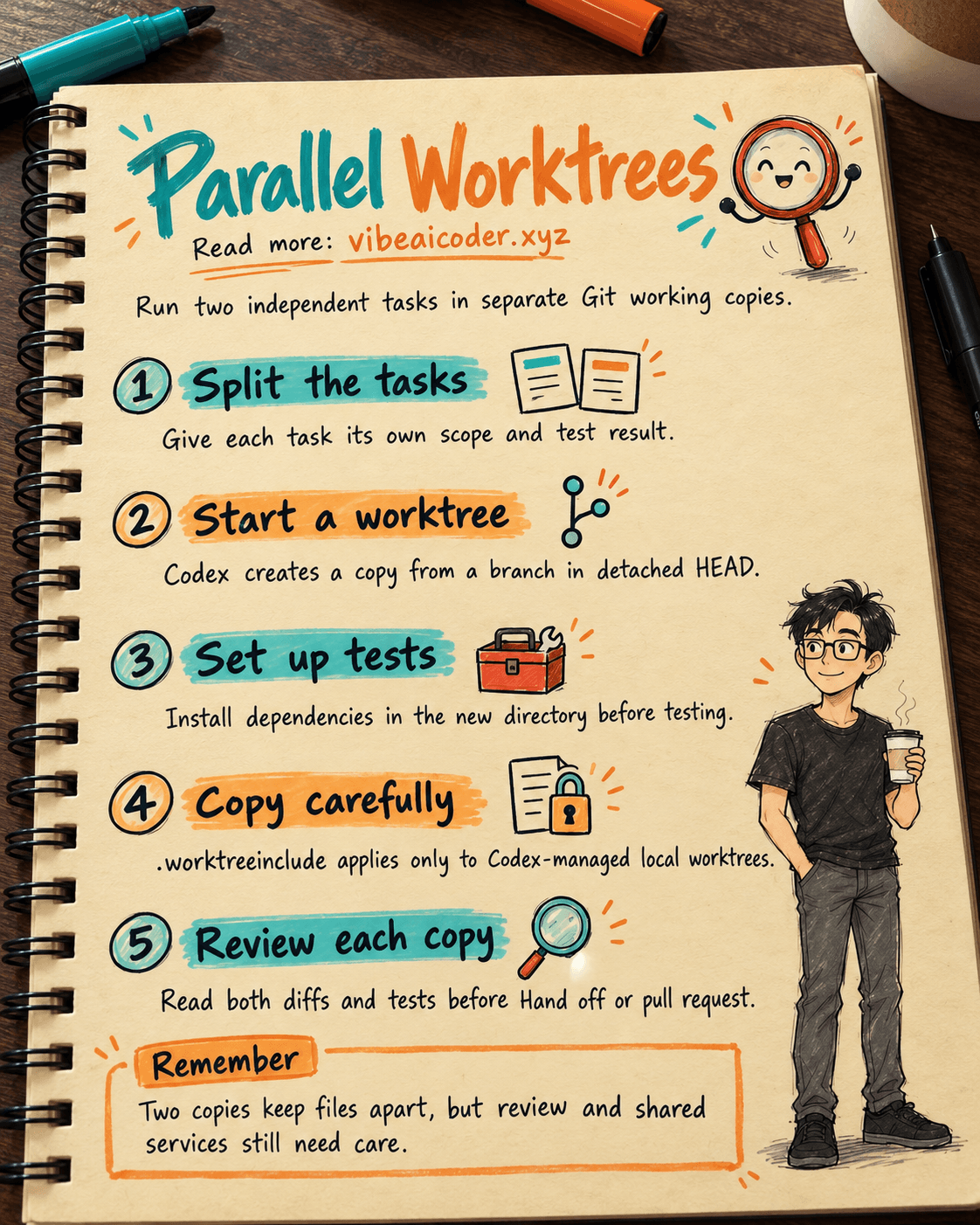
According to OpenAI's Worktrees guide, Codex uses a Git worktree to create a second working copy of the same repository. Each copy has its own files while sharing Git history. This separates two tasks that can run in parallel. You still need to inspect diffs, run tests, and review changes. If you are new to Codex in a repository, start with our first Codex CLI change guide.
 Prepare
Open the project in ChatGPT desktop and choose Codex. Confirm that the project directory is in a Git repository. Pick two small, independent tasks, such as work on the checkout page and the contact page. If both tasks touch the same file or depend on the same unfinished change, narrow them before trying to run them in parallel.
Record the starting branch, file status, and test command. Do not include passwords or customer data in the prompt. Our Codex scope and permissions guide covers command access in more detail.
In OpenAI's documentation, Local is the working copy you have open, Worktree is the separate Git copy that Codex creates, and Hand off moves the conversation and code between them. Worktrees require Git. A project without Git does not follow the same workflow. A worktree viewed from a phone does not run on the phone; Remote controls a connected computer or remote environment.
 Step by step
1. Choose work that is independent enough to run in parallel
Write two task notes, each with inputs, scope, and a completion check. For example: “Fix the message shown when the contact form has no email” and “Clarify the confirmation button label on checkout.” Do not give both conversations a broad request such as “improve UX.” You need to know which copy owns each change.
Start the first Codex conversation in Local. For the second task, choose Worktree beneath the input box while creating a conversation. Select the starting branch and send the request. Codex creates a worktree from that branch. OpenAI says the new copy starts in detached HEAD by default, so it is not yet on its own new branch.
Copy this request and replace the bracketed placeholders:
In [project name], change only [page or component].
Goal: [specific behavior after the change].
Do not change [area outside the scope].
Before finishing, run [project test command].
Report the changed files, test result, and anything still unverified.
The scope and reporting lines give you a way to check the output. If the repository has team rules in AGENTS.md, Codex also reads instructions that apply to its working directory. See our guide to shared AGENTS.md rules.
2. Make the new worktree testable
A worktree is another directory. It contains files from the starting Git commit, but it may lack installed packages, Git-ignored configuration, or services running in Local. A “missing package” error does not immediately mean Codex wrote bad code. Check the environment first.
OpenAI's Local environments guide lets you define a setup script that runs when Codex creates a worktree and an action for a command used often. This feature is available in Codex within ChatGPT desktop. In a Node project, a setup script might install packages and run a build. Choose commands for your actual project rather than copying these when it uses another package manager.
Example setup script for a suitable project:
npm install
npm run build

Example test action:
npm test
Configure the local environment in the app's Settings. OpenAI says the configuration is stored in the project's root .codex directory and can be committed so the team shares it. Test it in one worktree before rolling it out. If setup needs network access or expensive commands, record who reviews that access.
3. Handle ignored files deliberately
A new worktree normally lacks files excluded by .gitignore. If the application really needs a local file to run, OpenAI describes a root-level .worktreeinclude file that lists ignored files to copy into Codex-managed local worktrees. Its examples include .env, .env.local, and a custom configuration path. This mechanism copies files; it does not add them to Git.
Start with a dummy config file or test environment variables. Add a sensitive file only after you understand where it will be copied, who can access the destination, and how to revoke that access. OpenAI notes that this copying does not apply to remote worktrees or to Git worktrees you create yourself from the command line. Codex also does not copy source symlinks or overwrite an existing destination file.
Do not include an entire directory of secrets just to make one test run. Use fake data if the test does not need a real integration. If it does, check permissions and task scope separately before the agent receives access.
4. Review each task before moving changes to Local
When Codex finishes, open the diff of each conversation. Read the changed files, run the test command inside the worktree that contains the change, and try the behavior in the interface for a UI bug. Local environments includes Git controls for diff review, inline comments, partial staging, commits, pushes, and pull requests in the app.
Record results separately for the two tasks. If the worktrees touch the same file, read both diffs and decide the order of integration. Git cannot resolve a business-level conflict for you.
5. Decide whether to keep the worktree or Hand off
If you want to keep working in the worktree, use Create branch here to make a branch there. After review, commit, push, and open a pull request. Git does not allow the same branch to be checked out in two worktrees at the same time. Do not try to open that branch in Local while the worktree still holds it.
If you need the IDE, dev server, or an existing environment in Local, use Hand off in the conversation header to move back to Local. OpenAI says the app handles the Git operations needed for that move. If you Hand off again, the conversation returns to its associated worktree. Check Git status before and after, especially when Local has uncommitted changes.
Do not treat Hand off as a “merge everything” button. Inspect the diff, tests, and branch after moving. Keep your project's pull request review process. For larger work, see how to divide tasks with Codex Subagents. Subagents divide agent work; two Git checkouts are a different mechanism.
 Example result
In a trial, the contact task changes only its form and passes npm test in its worktree. The checkout task changes only the button label, which you inspect in the interface and test through the confirmation flow. You create a branch for the contact task to open a pull request, while you Hand off the checkout task to Local to test against a simulated payment environment. The team's task record keeps two ticket IDs, two diffs, and two test results separate.
If a worktree lacks dependencies and its tests cannot run, record “not yet verified.” Set it up, rerun the tests, and only then change its status.
 Tips for better results
Name each conversation after its task. Keep work small enough to review the diff quickly. If a needed file is not in Git, put it on the checklist before opening the worktree. Use a shared action for a repeated test command so new teammates run the same check.
OpenAI says Codex-managed worktrees can be cleaned up automatically. By default, the app keeps the 15 most recent worktrees, and you can change that limit in Settings. Active conversations, pinned conversations, and permanent worktrees are exempt from that cleanup. If you need a long-lived environment, make a permanent worktree rather than relying on a temporary copy.
 Limits to know
Worktrees do not isolate everything. Copies still share Git metadata and may depend on the same services, database, or network port on one machine. Two tasks using the same real data can interfere with each other. Use test data and test accounts when writes are possible.
Git-ignored files do not travel with Hand off automatically unless Codex copies them into a local worktree through .worktreeinclude. A copied secret is another accessible copy that must be managed. For remote worktrees, verify that environment's separate mechanism instead of relying on local copying instructions.
Features and interfaces can change. If you do not see Worktree or Local environments, check that you are using ChatGPT desktop, are in Codex, and have a Git project. Do not assume the desktop steps apply unchanged to a Codex CLI or browser session.
 FAQ
FAQ
Can I create a Codex Worktree for a project without Git? Not through this workflow. Worktrees depend on Git. You can work in a project directory, but the Worktree feature will not provide a separate checkout.
Must I create a branch before starting? No. When you choose Worktree and a base branch, Codex creates a detached HEAD checkout by default. Create a branch inside the worktree when you want to keep and push the changes.
Why do tests pass in Local but fail in the Worktree? Check dependencies, the setup script, ignored files, environment variables, and dependent services. A worktree is another directory with potentially different setup.
Can Local and Worktree check out the same branch? Git does not allow one branch to be checked out in two worktrees simultaneously. Use Hand off or create another branch that fits the team's process.
Will deleting a worktree delete the conversation? OpenAI says the conversation may remain in history. For Codex-managed worktrees, the app saves a snapshot before cleanup and may offer restoration when you reopen the conversation. Still commit or otherwise preserve important results according to your repository process.
Official sources: Worktrees and Local environments, OpenAI Learn, checked October 5, 2026.
More articles

Gemini 4 Argon Reads a 500-Page Chemistry Patent in One Afternoon

Claude Opus 5.5 Codes a Real Money Trading Game in One Day

What Is a Token in AI? Why ChatGPT and Claude Charge by Tokens

What Is Chain of Thought? Why Asking AI to Think Step by Step Works Better

Claude Sonnet 5.5 vs GPT-6.1 Sol: Which AI Model Is Worth Using?

 Claude Opus 5.5 Launches: 30% Faster, 40% Cheaper, Blocks AI Brain Copying