 Claude Code /goal: Assign a Task Once, AI Runs Until It's Done
Ever sat there babysitting Claude Code, watching it finish one step and then having to type the next instruction yourself? Claude Code v2.1.139 just shipped a /goal command built to fix exactly that pain point.
 The problem with the old workflow
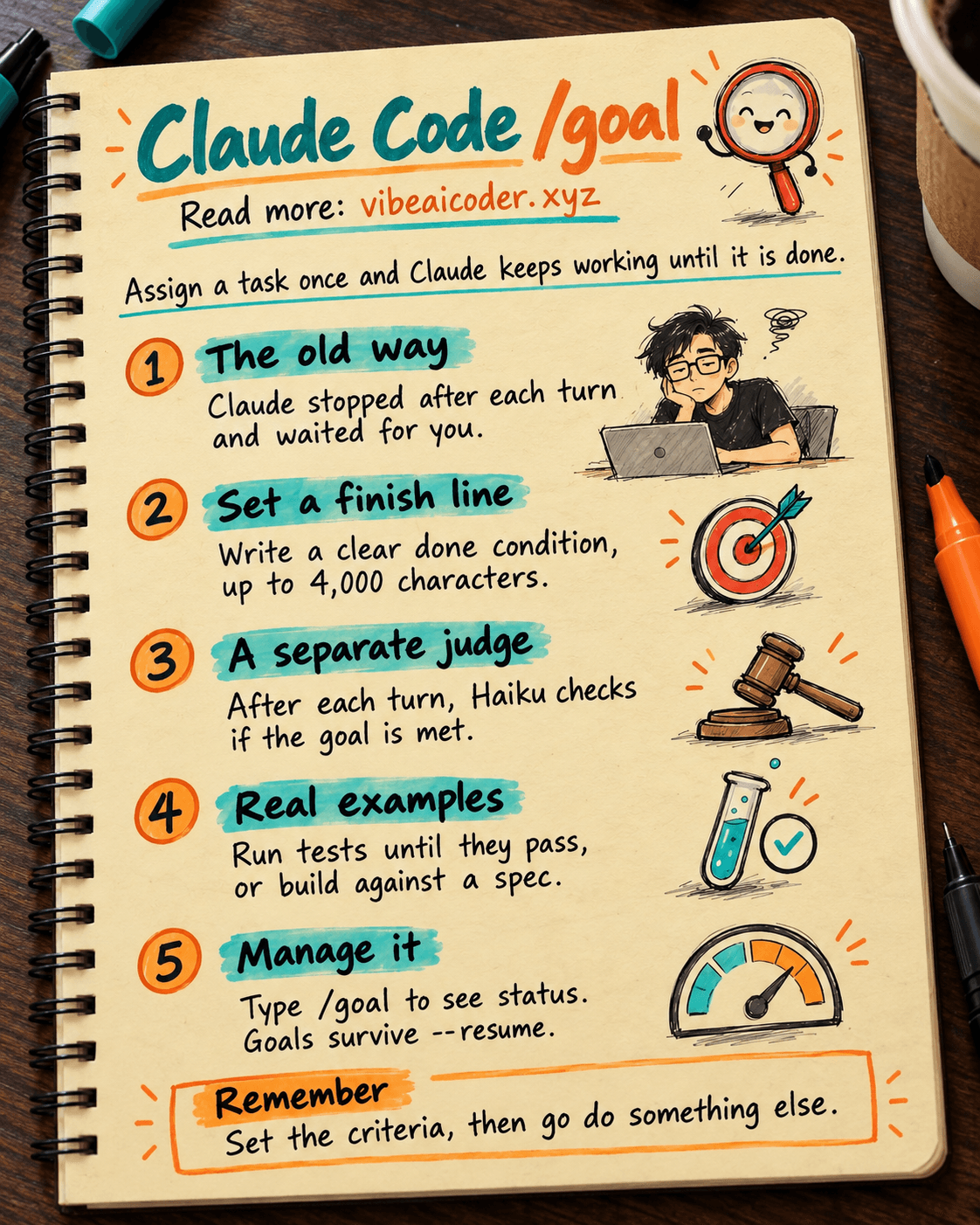
In the past, when you handed Claude Code a complex task, moving a module, refactoring a large folder, or fixing an entire test suite, Claude would work as hard as it could for one turn and then... stop and wait for you. You had to check the result, type something else, and nudge it forward again. Over and over.
For tasks that take five to ten turns to finish, that gets tedious fast. You can't step away and do something else because you have no idea whether Claude is stuck or already done.
 How /goal works
/goal lets you set a clear finishing condition, up to 4,000 characters. From there, Claude keeps iterating on its own, no extra typing required.
Basic syntax:
/goal all tests in test/auth pass and lint is clean
After each working turn, a small, independent model (Haiku by default) acts as a judge and checks whether the condition has been met. If not, the reason gets sent back to Claude so it can improve on the next pass. Once the condition is satisfied, the goal clears itself and Claude stops.
This is the key difference: the one deciding whether the work is "done" isn't Claude itself, it's a separate model. That prevents Claude from convincing itself a task is finished when it actually isn't.
 Real world examples
Here are a few ways to put /goal to use in everyday work:
Run tests until they pass:
/goal all tests in test/auth pass and lint is clean
Implement against a spec:
/goal implement exactly what the design doc specifies, all acceptance criteria met
Run it from the command line with auto mode:
claude -p "/goal CHANGELOG.md has an entry for every PR merged this week"
Combine it with auto mode and the whole process runs without you typing anything at all. Hand off the task, go do something else, and come back to the result.
 Managing a goal
Check the current status (just type /goal with no arguments):
Shows the active condition, elapsed time, number of turns taken, tokens used, and the judge's most recent evaluation reasoning.
Cancel early:
/goal clear
Recover after exiting:
Goals are saved and automatically restored when you use --resume or --continue. You won't lose progress even if you quit midway through.
One thing to note: /goal doesn't work when disableAllHooks is turned on, since its evaluation mechanism relies on hooks.
 Why this is a turning point for agentic coding
Before /goal, Claude Code was essentially an interactive tool: you assign, Claude works, you review, you respond. Your output depended on whether you were actually sitting there watching.
With /goal, Claude Code becomes a real agent: you set the criteria, and Claude operates on its own until it meets them. Anthropic describes the token cost of each evaluation pass as "typically negligible," since Haiku is cheap to run.
It's Anthropic's practical answer to the "agentic coding" demand developers have been waiting for: hand off a big task, then go work on something else.
On May 14, 2026, this update rolled out to Claude Code users. What will be the first task you try /goal on?
More articles

Gemini 4 Argon Reads a 500-Page Chemistry Patent in One Afternoon

Claude Opus 5.5 Codes a Real Money Trading Game in One Day

What Is a Token in AI? Why ChatGPT and Claude Charge by Tokens

What Is Chain of Thought? Why Asking AI to Think Step by Step Works Better

Claude Sonnet 5.5 vs GPT-6.1 Sol: Which AI Model Is Worth Using?
 Claude Opus 5.5 Launches: 30% Faster, 40% Cheaper, Blocks AI Brain Copying