What Is AI? Artificial Intelligence Explained Simply for Beginners (2026)
AI (artificial intelligence) is technology that lets computers do things that normally need human intelligence, such as understanding language, recognizing images, answering questions or making decisions. Instead of being programmed step by step, AI learns from huge amounts of data to find patterns on its own, then uses those patterns to handle new tasks. In short: AI is a machine that can learn and make good guesses, even though it does not really "think" the way people do.
This guide explains AI in plain words, no coding needed: what it can do, what it cannot do, and how to start using it safely.
 What is AI: the simplest definition
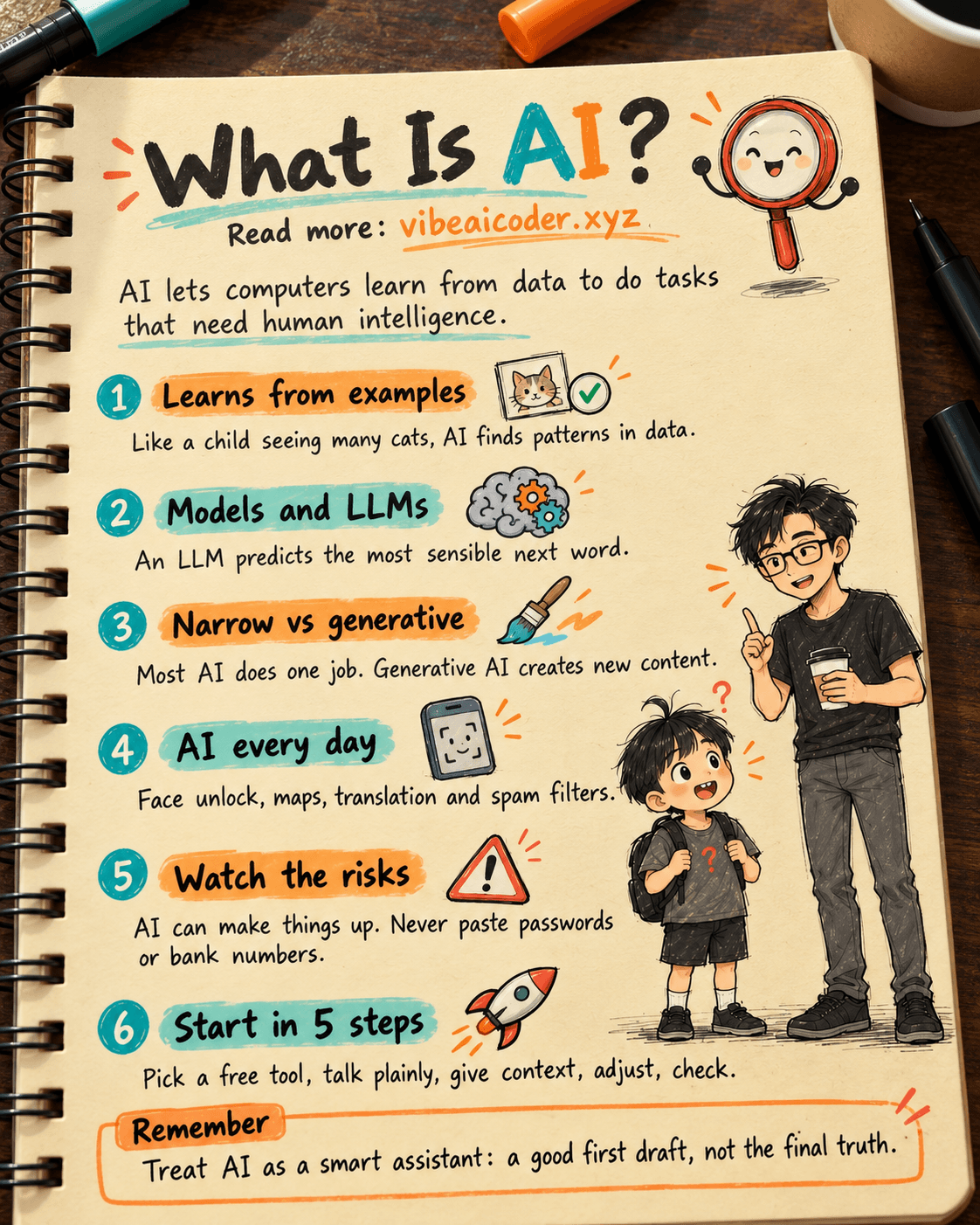
Think about how a child learns to recognize a cat. Nobody hands the child a rulebook like "four legs, whiskers, says meow". The child just sees lots of cats, hears an adult say "that's a cat", and slowly figures it out.
AI learns in a similar way. People show a machine millions of examples, and the machine works out what they have in common. Later, when it sees a photo it has never seen before, it can guess: "This looks like a cat."
A few things worth knowing from the start:
- AI has no consciousness or feelings. It is very good at spotting patterns, but it does not "understand" the world the way you do.
- AI can be wrong. Because it guesses based on what it learned, it sometimes guesses wrong, and it can be wrong with a lot of confidence.
- AI is not one single thing. It is an umbrella term for a whole field with many different kinds of tools.
The term "artificial intelligence" dates back to 1956, when a group of scientists in the United States held the first workshop on the topic. But only in the last ten years or so, once computers became powerful enough and the Internet had enough data, did AI really become part of everyday life.
 How AI works
You do not need any math to get the main idea. Most AI today works in three steps.
1. Learning from data
The most common approach is called machine learning: instead of writing every rule by hand, people give the machine lots of examples and let it learn. If you want AI to filter spam, you show it many emails already labeled "spam" and "not spam". If you want AI to recognize faces, you show it many photos of faces.
2. Building a "model"
The result of that learning is called an AI model. You can picture a model as a brain that has finished training: it holds what the machine learned from the data. Many powerful models today use neural networks (a way of organizing calculations inspired by how brain cells connect). When a network has many layers stacked on top of each other, it is called deep learning.
3. Using the model to make guesses
When you give it a question, a photo or a sound clip, the model uses what it learned to give the answer most likely to be right.
What is an LLM, simply explained
ChatGPT, Claude and Gemini all run on a type of model called an LLM (large language model). An LLM is trained by "reading" an enormous amount of text: books, articles, websites, code. From that, it learns how people write and talk.
At its core, an LLM does something that sounds very simple: it predicts the most sensible next word. But because it has learned from so much text, those guesses are good enough to write emails, summarize documents, explain lessons or write code. This is also why an LLM sometimes makes up information that sounds very real: it picks words that sound right, and it does not always check the facts.
 Types of AI worth knowing
Narrow AI and general AI
- Narrow AI (also called weak AI) is good at one specific job: playing chess, recognizing faces, recommending movies, translating text. Almost every AI you use today belongs to this group, including very capable assistants.
- General AI (AGI) is AI that can learn and do almost any mental task as well as an average person. This is still a goal that big companies are chasing. Nobody has shown they have reached it, and experts still argue a lot about when, or even whether, it can happen.
Generative AI
Generative AI is the group of AI tools that can create new content: write text, draw images, make music, produce video, write code. ChatGPT, Claude, Gemini and the text-to-image tools all belong here. This is the wave that made AI famous starting in late 2022, when ChatGPT launched.
More recently there is also the idea of an AI agent: AI that does not just answer but carries out several steps on its own to finish a job, for example opening a document, looking up information and then filling in a spreadsheet for you. To let agents connect to other tools, people use connection standards such as MCP. You can read more in What is MCP and how Claude connects to the tools you already use (in Vietnamese).
🏠 Everyday examples of AI
You may already use AI every day without noticing:
- Unlocking your phone with your face: AI recognizes that it is you.
- Video, music and product recommendations: YouTube, TikTok, Spotify and online stores use AI to guess what you like.
- Maps and directions: apps predict traffic jams and pick a faster route.
- Instant translation: point your camera at a sign in a foreign language and read the translation right away.
- Spam and scam filters: your inbox moves suspicious emails into a separate folder.
- Chatting with a chatbot: asking questions, writing, planning, studying.
Computers are also changing so they can run AI directly on the device instead of sending everything online. If you are curious, see What is an AI PC and NVIDIA's RTX Spark chip (in Vietnamese).
 Popular AI tools in 2026
The three AI assistants people talk about most right now:
- ChatGPT (by OpenAI): the best known AI assistant, good for questions, writing and making images. OpenAI just introduced a new model, covered in GPT-6 Astra launches, called OpenAI's safest model yet (in Vietnamese).
- Claude (by Anthropic): strong at writing, reading long documents and programming. Current Claude models include Opus 5.5 (the most capable), Sonnet 5.5 (a balance of power and speed), Fable 5.1 and Haiku 4.5 (small, fast and cheap). See also What's new in Claude Sonnet 5.5: faster and cheaper and What is Claude Fable 5.1 and how it differs from Sonnet and Opus (both in Vietnamese).
- Gemini (by Google): tightly linked to the Google ecosystem, such as Gmail, Google Docs and Android.
The best way to choose is to try all three on the same task of yours, or read ChatGPT vs Gemini vs Claude: which one should you pick (in Vietnamese).
 Benefits and risks of AI
Benefits
- Saves time: summarize long documents, draft emails and outline ideas in seconds.
- Helps you learn faster: ask about a hard concept as many times as you like, and get it explained in a way that makes sense to you.
- Opens up new things to do: people who cannot code can still ask AI to build a small website or a calculator tool just for themselves.
Risks
- Wrong information: AI can give wrong answers and make up book titles, numbers or sources. This is called "hallucination". For important matters like health, law or money, always double check with a trusted source or an expert.
- Privacy: what you type into a chatbot may be stored. Do not paste passwords, bank account numbers, personal documents or confidential company files.
- AI-powered scams: fake voices and fake videos (deepfakes) look more real every day. If a "relative" calls asking to borrow money urgently, call them back on a number you know to confirm.
- Safety of AI itself: AI companies are also testing whether their models can be misused for harmful purposes. A good example is Three AI models from OpenAI, Anthropic and Meta broke the rules while testing attacks on real systems (in Vietnamese).
- Relying on it too much: letting AI think for you about everything can make you lazy. Use AI as an assistant, and keep the final decision for yourself.
 How to start using AI as a beginner
You do not need to install anything complicated. Follow these five steps:
- Pick a free tool: go to ChatGPT, Claude or Gemini and sign up with your email. All three have a free plan.
- Talk to it like an assistant: write in plain everyday language, no special commands needed.
- Give it enough context: instead of "write an email", try "write a short, polite email to my manager asking for two days off". The clearer you are, the better the result.
- Follow up to adjust: not happy yet? Say "shorter", "friendlier" or "explain it like I'm in sixth grade".
- Check important facts: treat AI answers as a good first draft, not as absolute truth.
Once you are comfortable, you can ask AI to build small tools just for you. That is the spirit of vibe coding, which this blog is all about.
 Frequently asked questions
What is AI in one sentence? AI (artificial intelligence) is technology that lets computers learn from data to do tasks that need intelligence, such as understanding language, recognizing images and answering questions. It has no consciousness, it is just very good at spotting patterns and predicting results.
Are AI and ChatGPT the same thing? Not quite. AI is a whole broad field, while ChatGPT is one specific AI product made by OpenAI, in the generative AI group. Claude and Gemini are similar AI products.
Will AI replace humans? AI is already taking over many repetitive tasks such as drafting, summarizing and sorting. But it still needs people to set goals, check the results and take responsibility. People who know how to use AI usually work more effectively than people who don't.
Is it safe to use AI? Fairly safe if you follow a few rules: do not share sensitive personal information, always double check important facts, and watch out for fake voices and videos. Think of AI as a smart assistant that sometimes makes mistakes.
Can people who are not good with technology learn to use AI? Absolutely. Today's AI assistants understand everyday language and chat like a real person, so all you need is to type a question. Start with small daily tasks, then gradually try harder ones.
#AI #ArtificialIntelligence #WhatIsAI #ChatGPT #Claude #VibeAICoder
More articles

Gemini 4 Argon Reads a 500-Page Chemistry Patent in One Afternoon

Claude Opus 5.5 Codes a Real Money Trading Game in One Day

What Is a Token in AI? Why ChatGPT and Claude Charge by Tokens

What Is Chain of Thought? Why Asking AI to Think Step by Step Works Better

Claude Sonnet 5.5 vs GPT-6.1 Sol: Which AI Model Is Worth Using?

 Claude Opus 5.5 Launches: 30% Faster, 40% Cheaper, Blocks AI Brain Copying